Scaling the Databases: Choosing the right strategy
December 11, 2025
When I was working as a junior software engineer in my early days, I’d sit in meetings where people casually talked about “scalability” of our systems. I honestly thought it just meant “Can our database survive more traffic without crashing?” and left it at that.
Over time I realized people were really asking a deeper question:
As the business and the app grow, can the database not only survive, but also keep up and stay fast?
Scalability isn’t only about scaling up when demand spikes. Good systems also let you scale down when traffic is low, so you’re not burning money on overkill infrastructure at 2 a.m.
When a database can’t scale, it usually fails in a few predictable ways:
- CPU / memory get overloaded – queries slow down, timeouts appear, and the database starts thrashing.
- Storage gets tight – disks hit capacity, writes fail, or you have to scramble for emergency cleanup.
- The network becomes a bottleneck – too much data moving in and out, and everything feels sluggish.
In this article, we’ll walk through the core horizontal and vertical scaling strategies.
By the end, you should have a clear mental model of when to use each approach and how they fit together as your app and traffic grow.
What is Vertical Scaling?
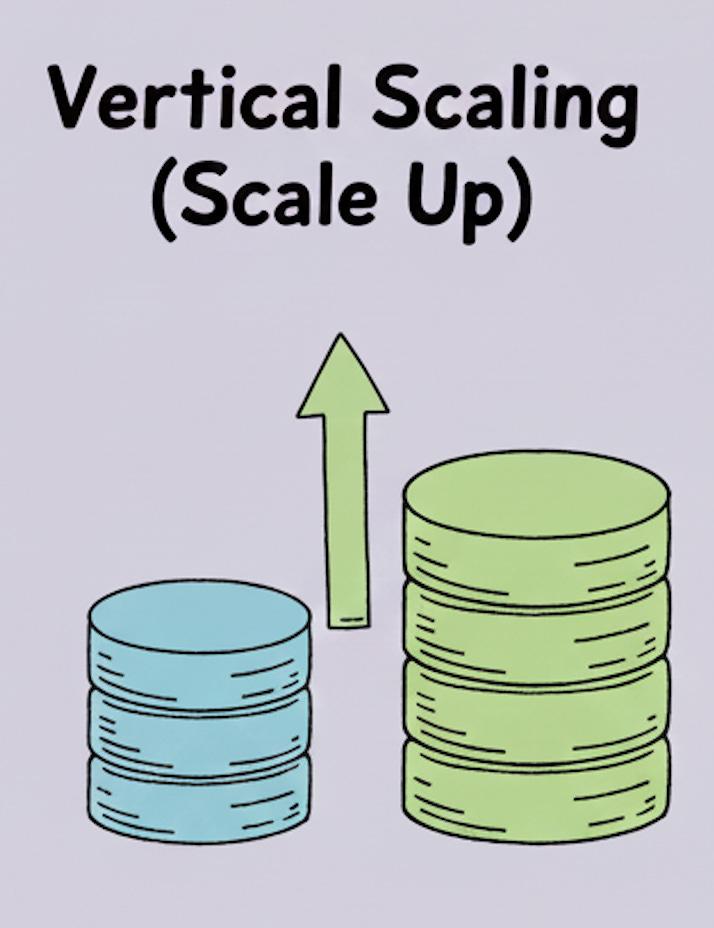
- Vertical scaling is the process of increasing the power/capacity (CPU, RAM, storage) of one server. In the context of database it is about making one database machine more powerful instead of adding more machines.
- Instead of adding more servers, you:
- Increase CPU
- Add more RAM
- Upgrade storage (faster disks / more capacity)
- Improve network bandwidth
- It’s a quick and easy solution when you have a smaller database (considering that in today’s day and age our infra is on cloud and we dont have to deal with all the ugliness that comes with it, as the cloud providers provide us with one click solution to upgrade the database while they handle all the complexities).
Challenges in Vertical Scaling
- Hard ceiling / physical hardware limit There’s always a maximum size for a machine. At some point, you hit the largest instance your cloud provider offers (or the biggest box you can reasonably buy). After that, you have to think about horizontal scaling.
- Potential downtime during upgrades Scaling up often requires a reboot or some kind of failover. Managed services (like AWS RDS, Cloud SQL, etc.) automate this, but you still often see a short hiccup where connections drop or error out for a few seconds.
- Single point of failure All your workload is concentrated on one main server. If that machine has a hardware issue, crashes, or needs emergency maintenance, your database can go down until it’s fixed or a backup takes over.
- Cost grows non-linearly Bigger instances are often much more expensive than smaller ones. At some point, it can be cheaper (and more scalable) to add more machines (horizontal scaling) instead of endlessly upgrading a single monster server.
What is Horizontal Scaling?
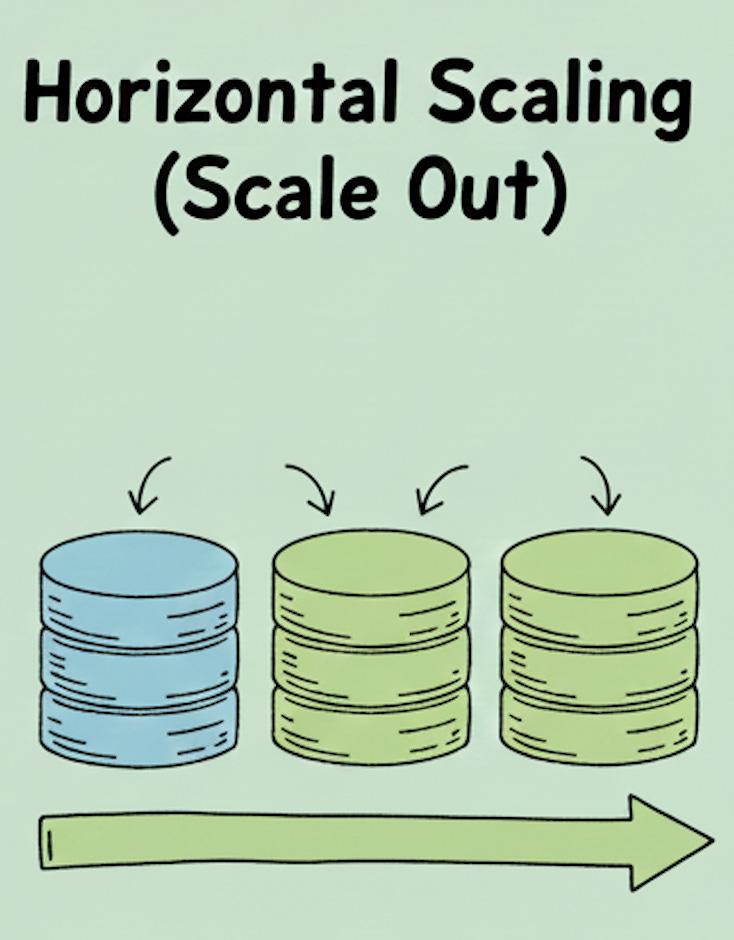
- Horizontal scaling is the process of adding more machines and spreading the workload across them. In the context of database it is spreading the database workload across them.
- In databases, this usually shows up as:
- Read replicas
- Shards
- Split workloads
The natural question for anybody to ask would be (which even I asked myself), why would horizontal scaling in databases show up like that and why not similar to horizontal scaling in backend services? And that’s a very good question.
For backend services, horizontal scaling is simple: you add more app servers behind a load balancer, and any server can handle any request. The servers are mostly stateless, so it doesn’t really matter which one you hit.
Databases are different because they store the actual truth of your data.
You can’t just spin up 5 separate database servers and let all of them accept writes on their own. Very quickly, they would disagree about the data. We want the database to be consistent, meaning every user and every server should see the same truth.
So when we add more database servers, we have to decide how they share data and who is allowed to do what, and while scaling a database we should scale both the reads and the writes:
- Sometimes we add read replicas → one primary server handles writes, replicas handle reads (scaling the reads).
- Sometimes we shard the data → each server holds a different slice of the data and only answers queries for that slice (scaling the writes).
Horizontal scaling for databases is still “add more servers,” but always with a clear plan for who stores what and who handles which reads/writes.
Horizontal Scaling: Read Replicas
Read replicas are a standard way to scale reads from a database.
In most real-world systems, the read:write ratio is heavily skewed towards reads. So instead of letting one database handle both reads and writes, we separate them:
- One database is the primary/master – it accepts all writes.
- One or more read replicas called the slaves/followers are read-only and they handle only SELECT queries.
This way, we can scale reads independently by adding more replicas as traffic grows.
How do reads and writes go to different databases?
This does not happen automatically at the database level.
The application / API layer is responsible for routing:
- You typically have two connection objects / pools:
- One for the primary (reads + writes, or sometimes writes only)
- One for the read replicas (reads only)
- In the business logic, you decide:
- “This is a read query → use the replica connection.”
- “This is a write/update query → use the primary connection.”
Just for example in the application layer it may look like this:
import psycopg2
from contextlib import contextmanager

# Primary (read + write)
PRIMARY_DSN = "dbname=app user=app_user password=secret host=primary-db"
# Read replica (read-only)
REPLICA_DSN = "dbname=app user=app_user password=secret host=replica-db"

@contextmanager
def primary_conn():
    conn = psycopg2.connect(PRIMARY_DSN)
    try:
        yield conn
    finally:
        conn.close()

@contextmanager
def replica_conn():
    conn = psycopg2.connect(REPLICA_DSN)
    try:
        yield conn
    finally:
        conn.close()

// ---------- Business logic layer ----------

def get_user_by_id(user_id: int):
    """READ → goes to replica"""
    with replica_conn() as conn:
        with conn.cursor() as cur:
            cur.execute("SELECT id, name, balance FROM users WHERE id = %s", (user_id,))
            return cur.fetchone()

def update_user_balance(user_id: int, amount: float):
    """WRITE → goes to primary"""
    with primary_conn() as conn:
        with conn.cursor() as cur:
            cur.execute(
                "UPDATE users SET balance = balance + %s WHERE id = %s",
                (amount, user_id),
            )
        conn.commit()
But what about consistency?
Good question: if all writes go to the primary, how do replicas see the latest data?
Changes made on the primary must be replicated to the replicas. This is done through replication, and there are two common modes:
1. Synchronous replication
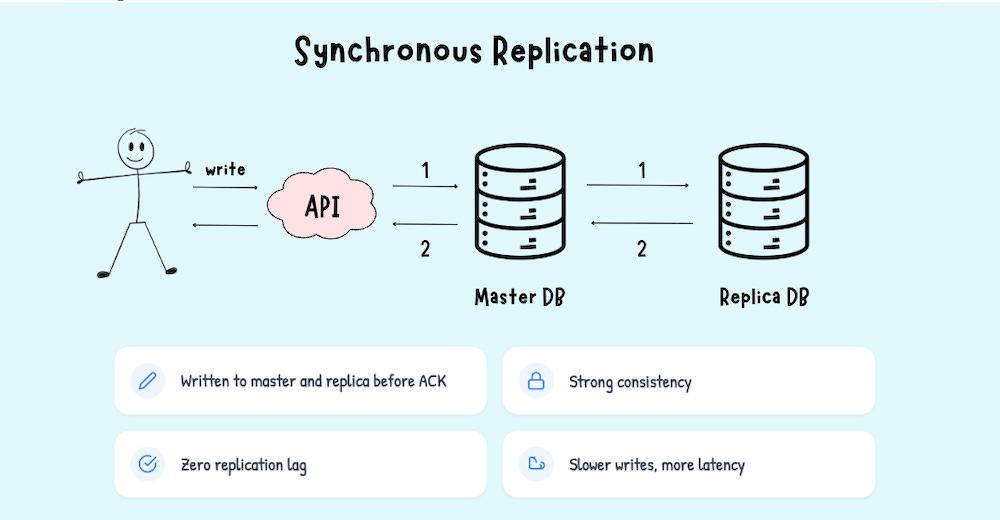
- When a write comes to the API:
- The API sends the write to the primary.
- The primary sends the change to the replica(s).
- The write is considered successful only after the replica(s) confirm the update.
- The API will not respond “OK” until both primary and replica have written the data.
Pros:
- Very strong consistency – replicas are always up to date.
- Replication lag ≈ 0 (no measurable delay between primary and replica).
Cons:
- Slower writes (you’re effectively writing to multiple databases on every request).
- If a replica is slow or down, it can affect write latency/availability.
2. Asynchronous replication
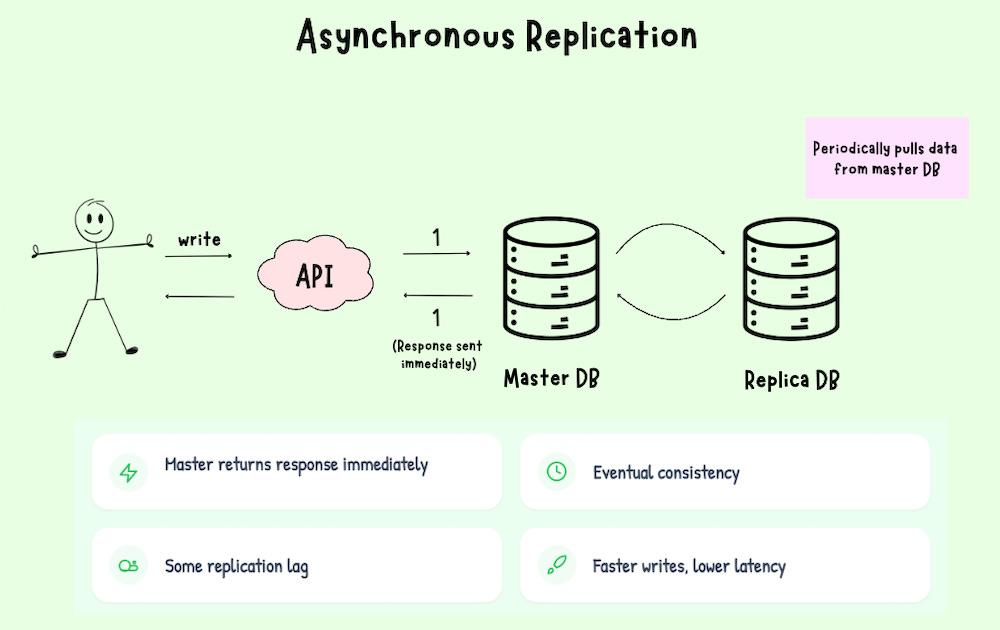
This is what most production systems use by default.
- The primary commits the write and immediately acknowledges success to the API.
- Replicas pull changes from the primary later (via logs, binlog, WAL, etc.).
- The replica applies those changes on its own copy of the data.
Pros:
- Writes are fast – you only block on the primary.
- System is more available even if a replica is slow.
Cons:
- There is replication lag – a short window where:
- The primary has the new value.
- The replica still has the old value.
- Reads from replicas may see slightly stale data.
This is the trade-off: strong consistency vs. performance and availability.
Horizontal Scaling: Sharding
Problem: We already used read replicas to scale reads. But if one primary node still has to handle all writes, it becomes a bottleneck.
Idea: Split the data horizontally across multiple databases (shards), so writes are spread out instead of hitting a single node.
A shard is just a subset of your data stored in a separate database. Example:
- Shard 1 → Users with IDs 1–1,000,000
- Shard 2 → Users with IDs 1,000,001–2,000,000
You can (and usually should) have replication inside each shard:
- Shard 1 primary + read replicas
- Shard 2 primary + read replicas
So you end up with: sharding for scaling writes, replication for high availability + read scaling.
The decision of which shard to hit is made in the API / application layer. We define a routing strategy in our code, and every read/write request goes through that logic.
function getShardId(userId: number) {
  return userId % 4; // 0,1,2,3 → 4 shards
}

function getShardConnection(userId: number) {
  const shardId = getShardId(userId);
  return shardConnections[shardId]; // pick the right DB client
}
For more complex setups, instead of a formula we use a shard map / lookup table:
- Key → shard mapping is stored in a table or config (e.g., tenant → shard).
- The API first looks up the shard id, then uses the appropriate DB connection.
In both cases, the router is just application logic (or a small routing service) that maps:
business key → shard id → DB connection
This brings us to the end of this article. I hope you were able to take away something useful and build a clearer mental model of how databases scale.
In the next part, we’ll go much deeper into sharding: we’ll look at different sharding strategies, how sharding compares to partitioning, and explore even more patterns to scale reads and scale writes as your system grows.
If you liked this article then please do Subscribe to my weekly newsletter!