Forward Proxy vs Reverse Proxy
January 19, 2026
Let's start with a very simple analogy to understand both proxy types, and then we'll understand what they are and why they are used.
Simple Analogy for Client-Side Proxy

Imagine you are a very famous person, and you want to buy vegetables for cooking, but you do not want anyone to recognize you. So you send your personal assistant to the store to buy them for you. The store owner only sees the assistant, sells the vegetables, and has no idea who they are actually for. In other words, your assistant is hiding your identity from the outside world.
Here:
- You are the client
- Your personal assistant is the forward proxy
- The store / store owner is the internet website / server
So a forward proxy sits between the client and the internet, makes requests on behalf of the client, and helps hide the client's identity (plus it can apply rules like allow/block/log if needed).
Simple Analogy for Server-Side Proxy

When you go to a restaurant and want to order food, you do not walk into the kitchen and talk to the chefs directly, right? Instead, you place your order with the waiter/host. They check the menu, make sure the order is valid, and then pass it to the chef so it can be prepared.
In this scenario:
- You are the client
- The waiter/host is the reverse proxy (server-side proxy)
- The chef/kitchen is the server
So the reverse proxy's job is to sit in between and make sure the client does not interact with the server directly, it accepts the request, applies rules/filters if needed, and forwards it to the right server. The reverse proxy (the host/waiter) is protecting and managing the kitchen (server) from bad/too many/invalid requests.
Hope you got a fair understanding with this analogy, but now let's dive in.
What is a Proxy?
Proxy is nothing but a machine that sits between two systems. A proxy terminates the incoming connection and initiates a new, separate connection to the destination.
It acts like an intermediate layer that can:
- apply rules (allow/block),
- route traffic,
- hide details of the other side,
- and make communication more controlled and predictable.
Common misconception is that it can be only between a client and a backend servers, but it can also be between two backend servers.
Depending on the kind of proxy that we are using in our system, it will have different applications:
- Forward Proxy: This type of proxy is used to protect the clients accessing the websites via the internet.
- Reverse Proxy: This type of proxy is used to guard the web servers from the clients trying to access websites via the internet.
Let's understand each of them in depth.
Forward Proxy (Client-Side Proxy)
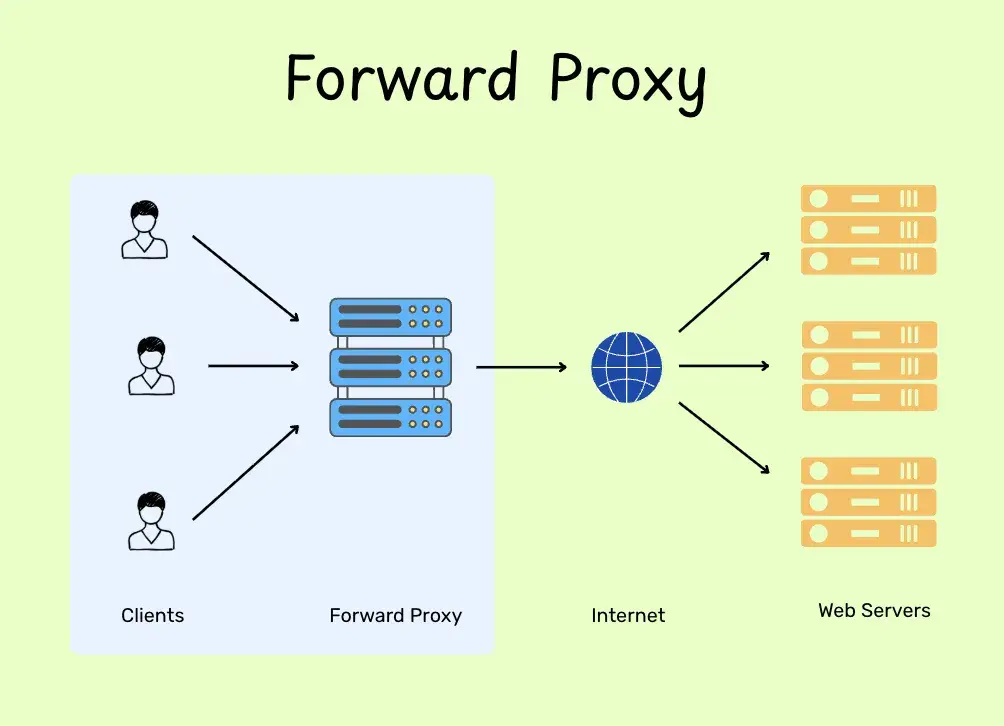
Forward Proxy (also called a client-side proxy or internet-facing proxy) sits between the client and the internet (for example, between your browser and a website). So whenever your browser makes a request, it sends (in plain text without encryption) that request to the forward proxy first.
The forward proxy can decide whether to allow it, block it, or route it to the correct destination server.
Then the destination server sends the response back to the forward proxy, and the forward proxy forwards that response back to your browser.
So the forward proxy's job is to act as a middleman for the client, it can hide the client's real identity (IP) from the internet and also control/log what the client is allowed to access.
Advantages of Forward Proxy
- Content filtering and security: They can filter out unwanted or dangerous content. Proxies can block access to specific sites and protect the network by filtering out suspicious requests or malicious files before they reach the user.
- Anonymity: A forward proxy hides the client's IP address from the destination server. Since the server only sees the proxy's IP, it makes it much harder to track individual user activity or target specific clients for an attack.
- Caching: Forward proxies cache frequently requested resources. When another requests the same data, the proxy serves it directly from its cache instead of fetching it from the internet. This reduces bandwidth usage and speeds up load times.
- Request Modification: Proxies can modify outgoing requests by adding or removing headers. This allows an organization to customize how traffic looks to the outside world or strip away sensitive information for better privacy.
- Access Control: They enforce strict rules on who can access the internet. By requiring authentication and authorization, the proxy ensures that only permitted users or devices can reach external resources.
Real world example:
Usually used in organizations/educational institutions/country when they want to stop people from seeing certain content, they use a proxy. Every request you make must pass through this point. If you try to access a blocked service, the proxy spots it and stops the connection instantly based on certain rules and policies set up on the proxy.
This allows these organizations or even an entire nation to enforce strict rules on what is allowed inside their network.
Reverse Proxy (Server-Side Proxy)
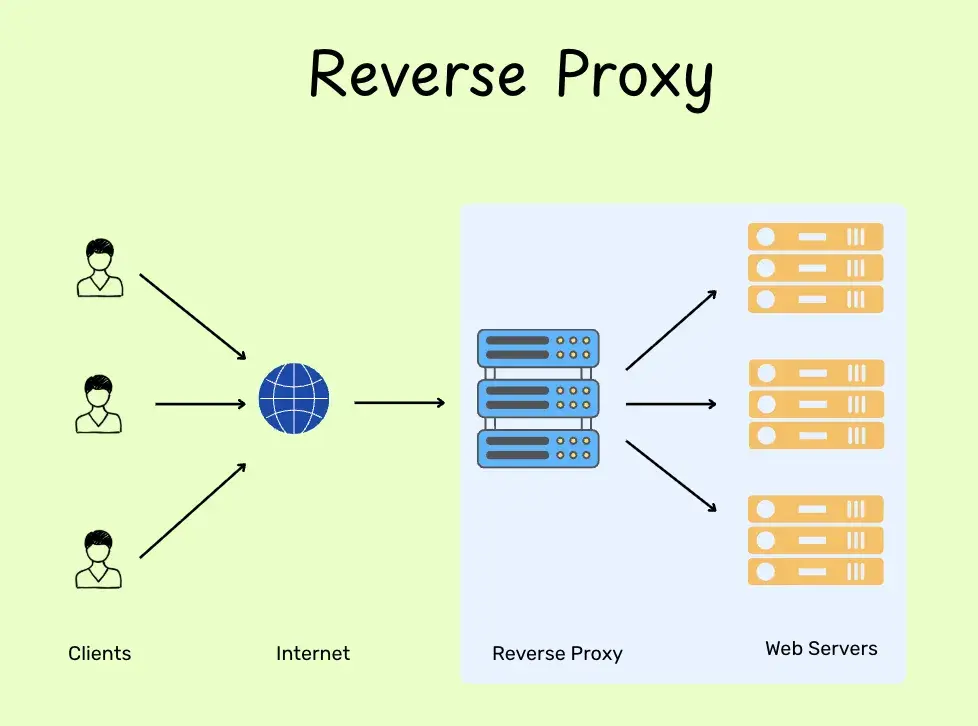
A Reverse Proxy (Server-Side Proxy / internal-facing proxy) sits between the internet and the web servers (the destination). When a user makes a request to a website, the request hits the Reverse Proxy first. The proxy then decides which backend server should handle the request.
Once the server finishes the job, it sends the data back to the proxy, which then passes it back to the user.
While a forward proxy acts as a middleman for the client, a reverse proxy acts as a middleman for the server. It hides the servers' real identity and protects them from the internet. It abstracts away the complexity of the downstream systems.
Advantages of Reverse Proxy
- Load Balancing: Reverse proxies act as traffic controllers. They distribute incoming requests across multiple servers so that no single server gets overwhelmed.
- Server Protection and Security: The proxy acts as a shield. It hides the real IP addresses of the backend servers, making it impossible for hackers to target them directly. It can also block DDoS attacks or suspicious traffic before it even reaches the actual data.
- SSL Termination: Handling the HTTPS lock icon (encryption) is heavy work for a server. The reverse proxy handles all the encryption and decryption, freeing up the backend servers to focus strictly on its tasks.
- Caching: Reverse proxies can cache frequently requested resources, reducing the need for repeated requests to the web servers.
- Response Modification and Compression: The proxy can compress files to make them load faster. It can also add or remove information from the server's response (headers) to make it more secure before it reaches the user.
Example:
- An API Gateway is a specialized reverse proxy built for APIs
- A load balancer is a specialized reverse proxy for traffic distribution
- DB Proxies are specialized forms of reverse proxy (sits in front of databases, handles connection pooling, and caches common query results)
- CDN (Content Delivery Network): A specialized, globally distributed reverse proxy
Reverse Proxy can be all of these, but all of these cannot be a reverse proxy.
Industry-standard reverse proxies: Nginx, HAProxy, Kong Gateway, ProxySQL
Some must-know differences when it comes to this topic would be:
Proxy vs VPN
-
VPN: A VPN creates a secure, encrypted tunnel for all the device's traffic (browsers, apps, system updates). It is secure because it encrypts your data, unlike proxies where it send in plain text (unencrypted). This hides your IP system-wide.
-
Proxy: It only works at the application level (for example, just your web browser). It does not usually encrypt your data; it just masks your IP address for that specific app. It allows only for one app, not system wide.
Proxy vs Firewall
-
Firewall:
A firewall sits at the edge of the network and scans incoming and outgoing data packets (it only looks at the header of the data: IP and Port). It does not open the data. It can block/allow connections instantly based on rules, no need to terminate the connection. If the data is coming from a suspicious source, the firewall stops it at the door before it can get into your computer. So it just filters and blocks, it does not have proxy characteristics like caching. -
Proxy:
It is a middleman that terminates the client connection and starts a new connection to the server. Because it acts as the destination, it can read the data to perform caching or content filtering.
Hope you liked this article.