Shell Scripting for Devops Beginners : Part 1
November 07, 2025
Linux is the backbone of DevOps, cloud engineering, and backend systems. Whether you’re debugging servers, analyzing logs, or writing CI/CD scripts these commands will be your daily tools.
This guide gives you the most used file, directory, process, networking, and shell scripting commands with simple explanations.
Series
1. File and Directory Commands
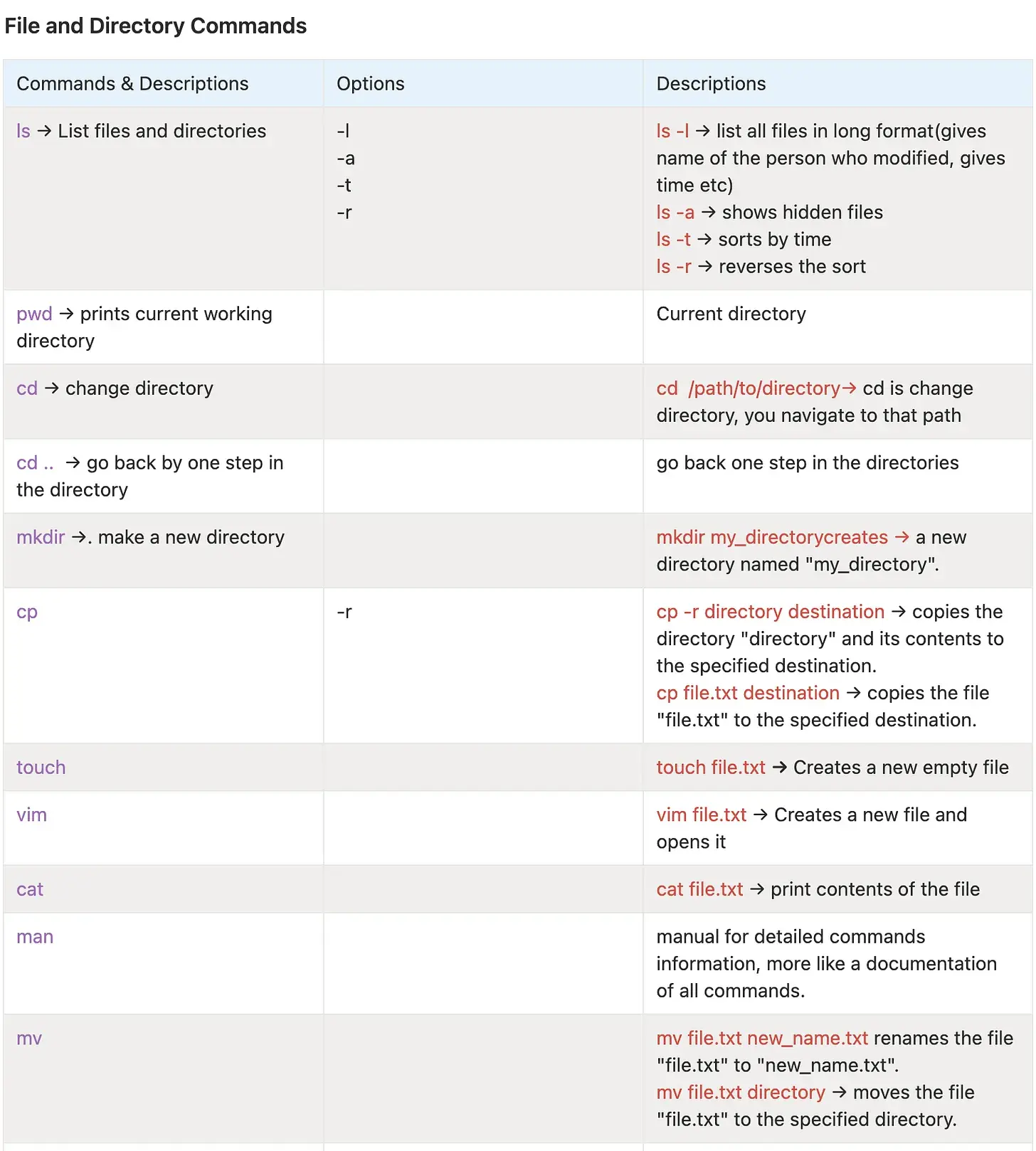
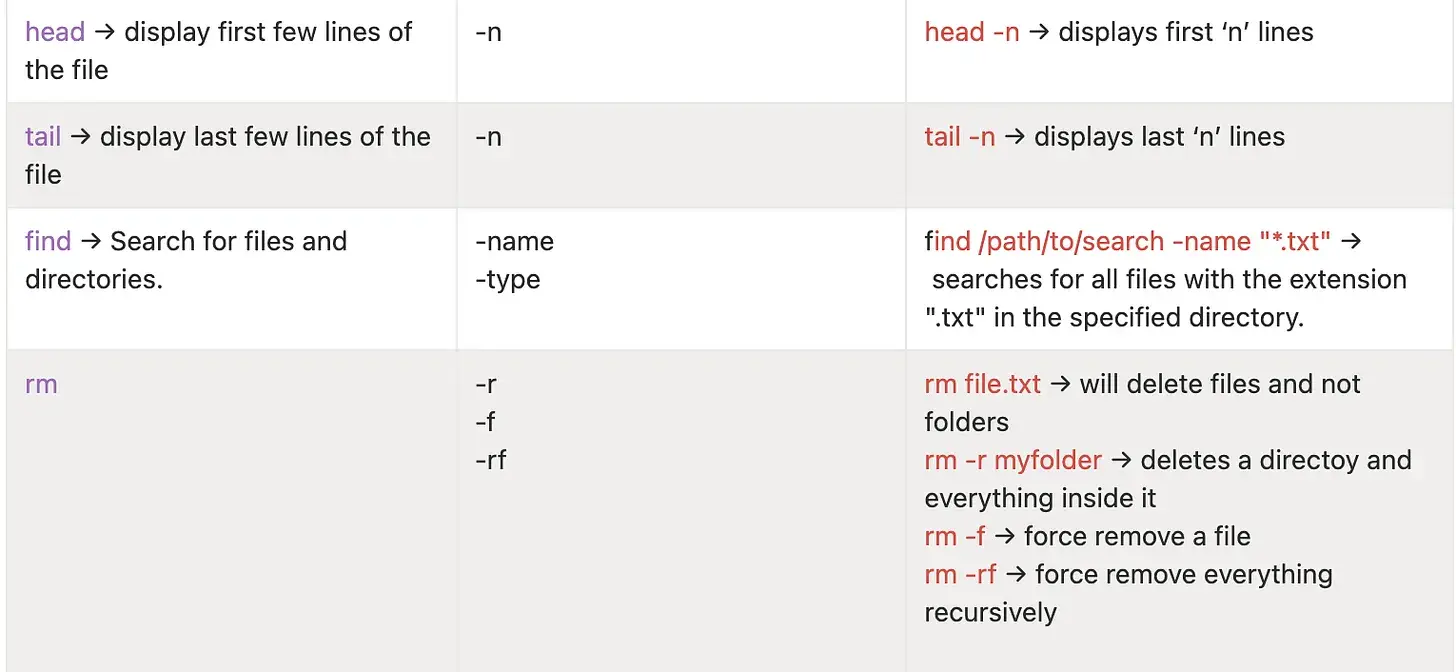
2. How to Execute a Shell Script
There are two ways:
./script.shsh script.shRequires chmod +x script.sh, in case of permissions.
But what is chmod? We will read about it in this article.
3. Good Practices for Shell Scripts
- Add metadata/comments at the top.
- Use safety flags:
set -x // Enables debug mode, prints each command and its output before running it.
set -e // If an error occurs anywhere in the script, the script fails immediately.
4. What is sudo?
sudo = super user do.
Allows you to execute commands as a root/admin user.
If we want to switch user and execute something, we can do:
sudo su pradyumna5. chmod = Change file permissions
It controls who can read, write, and execute a file or directory.
chmod <permissions> <file>Examples:
chmod 755 script.sh
chmod 644 myfile.txt
chmod +x script.sh
Permissions have three roles:
- Owner or administrator
- Group
- Others
And the permissions are these three:
r= readw= writex= execute
Two ways to use chmod
Octal method
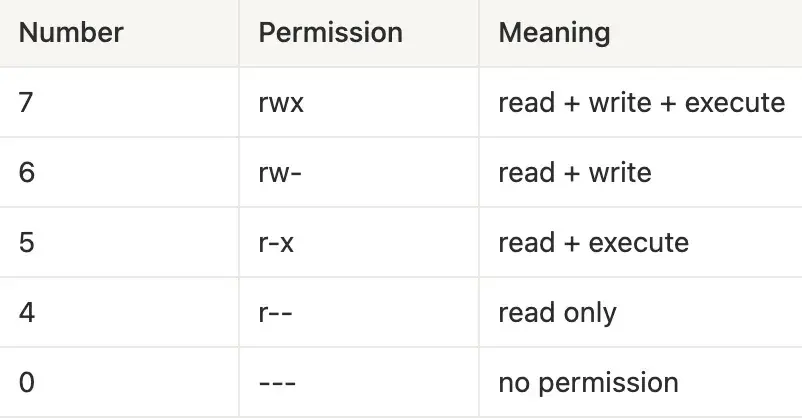
chmod 755 script.sh // means owner has (rwx) privileges and group and users have (r-x) permissionsSymbolic method
Using letters:
u= user (owner)g= groupo= othersa= all
chmod +x script.sh // makes file executable
chmod o-w file.txt // removes write permission for others
chmod g+r file.txt // adds read access for groups
chmod +x deploy.sh // adds +x to all owners, groups, and users
chmod 644 file.txt // means files are readable by all
chmod 777 file.txt // complete open permission to do whatever to all
6. chown - Change owner
It is just like chmod, but instead of changing permissions, it changes ownership.
It changes the owner and/or group of a file or folder.
chown pradyumna file.txt
chown pradyumna:admin file.txt # change owner and group
chown :admin file.txt # change group only
We mostly use chown when we create a file with root, but want a user to edit it.
So chown changes the owner of the file and chmod changes what permission the file has.
We will talk about some networking commands, process management commands, and loops and conditional operators in shell scripting along with some interview questions in the next one.
Hope you have a nice day.
If you liked this article, then please do Subscribe to my weekly newsletter!