Next.js concepts series : Part 1
November 04, 2025
Index
What is Next.js? How is it different than React?

React.js is a JavaScript library for building UI. You can read more about React in this article - React Concepts.
React handles only the frontend part of the app. It doesn’t decide on its own how pages are routed, how data is fetched, or how the app runs on a server.
If we use React alone, we often add extra packages like:
react-router-domfor routing and navigationaxiosorfetchfor API calls to get data from the backend
Meaning we manage all the wiring and configurations manually.
Whereas Next.js is a framework built on top of React. It takes everything that React can do and adds a few missing pieces while making existing stuff easier. Next.js comes with all the things that we had to manually wire like routers, etc.
To name a few:
- File-based routing – every file in the
/pagesfolder automatically becomes a route - Server-side rendering (SSR) – pages can load faster and are SEO-friendly
- API routes – you can create backend endpoints inside your app without a separate server
- Image and performance optimization – built-in
<Image />component and caching - Static site generation (SSG) – generate pages at build time for even faster delivery
We will go deeper into all of the concepts to understand what Next.js provides us.
Let’s dive right in.
1. Next.js Boilerplate
We can generate a fresh install boilerplate code using the command:
npx create-next-app@latest my-appWe can run the application using:
npm run devWe will understand what every page is meant for as we delve deep in this article.
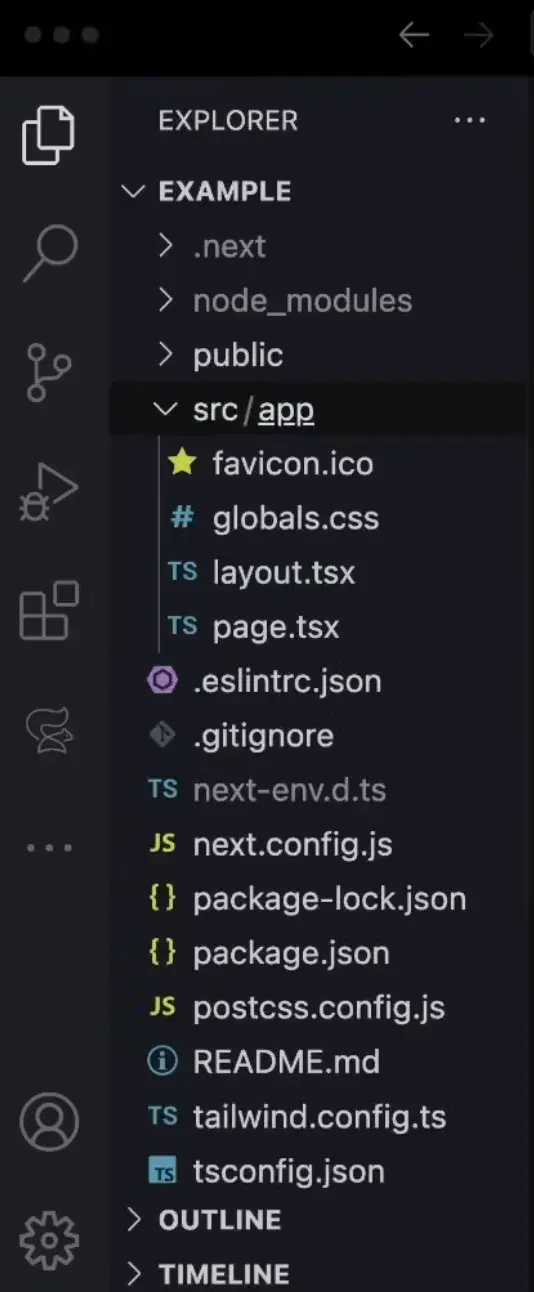
2. Routing and Navigation
Inside the src/app directory, this is the place where we define all our routes. Inside this directory, we can see that there is a page.tsx, this is basically meant for the homepage. So this would be localhost:8080.
Now, if we would want a posts page, meaning something like localhost:8080/posts, how would we do that? In case of React we would setup manual routes like this:
import { BrowserRouter, Routes, Route } from 'react-router-dom';
import Home from './Home';
import Posts from './Posts';

function App() {
  return (
    <BrowserRouter>
      <Routes>
        <Route path="/" element={<Home />} />
        <Route path="/posts" element={<Posts />} />
      </Routes>
    </BrowserRouter>
  );
}

export default App;
Here, we are using react-router-dom to manually define paths and map them to components. We have to explicitly import, wrap, and configure everything.
But in Next.js, routing is automatic and file-based, no need for manual setup.
Inside the app directory, each folder name represents a route. The file page.tsx inside it defines what gets rendered when you visit that route. This way it makes it easier for us to create static routes like localhost:8080/posts.
For example:
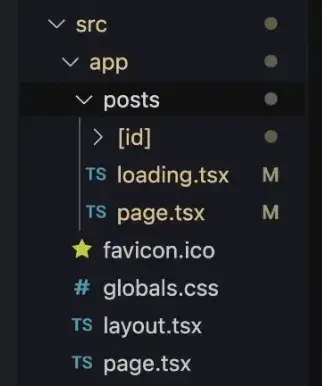
Now, if we want to create dynamic routes like localhost:8080/posts/:id?
In React we would handle this manually with a dynamic route parameter inside our router configuration:
<Route path="/posts/:id" element={<Post />} />And then extract the id from the URL using a hook like useParams().
However, in Next.js, we simply create a dynamic folder by wrapping the parameter name in square brackets, like in the image below.

Now what does page.tsx do? In simple words, each page.tsx file tells Next.js: “Render this component when someone visits this route.”
What is layout.tsx inside src?
The file layout.tsx is the root layout of your application. You can think of it as the frame that wraps around every page.
In simple words, this is where the overall structure and shared UI elements live.
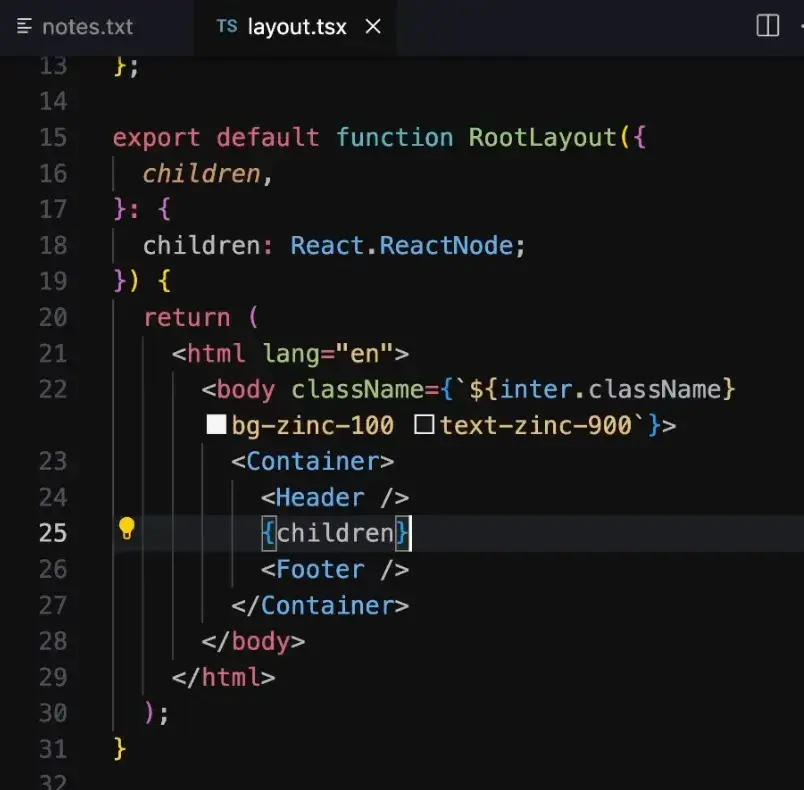
Here in the layout:
RootLayoutis the main layout component.- The special prop
childrenrepresents whicheverpage.tsxis currently active. - Header and Footer are present across all pages as children are sandwiched between them.
So when you navigate between pages, only the children changes, but the layout remains the same.
Now that we have multiple pages like /, /posts, and /posts/[id], we need a way to move between them without reloading the entire page.
That’s where the Link component from next/link comes in.
The traditional <a> used for routing usually makes a new request to the server and completely reloads the page, whereas the Link component prevents that.
import Link from 'next/link';

function Home() {
  return (
    <div>
      <h1>Welcome</h1>
      <Link href="/posts">Go to Posts</Link>
    </div>
  );
}
When you click the tab that takes you to /posts, 3 good things happen:
- It prevents the default browser reload.
- Updates the URL in the address bar.
- Dynamically renders the new component (
<Posts />) inside the same page, without reloading.
3. Metadata
Next.js makes it super easy to manage metadata, things like the page title, description, and SEO information.
By default, you can define metadata globally inside your layout.tsx file.
For example:
// app/layout.tsx
export const metadata = {
  title: 'My Blog',
  description: 'A simple blog built with Next.js',
};
The title here is what appears on the browser tab, and it’s also what Google and other search engines will show when your page appears in search results.
But sometimes, if we want a specific title or description for a particular page, for example, a custom title for the /posts page or a unique one for each blog post:
// app/posts/page.tsx
export const metadata = {
  title: 'All Blog Posts | My Blog',
  description: 'Browse all blog posts and tutorials.',
};
In that case, you can override the global metadata by defining the same metadata object inside that specific page.tsx file.
4. Special files in Next.js
Next.js has some special files meaning, each of these files have some unique functionality. For example:
favicon.ico- This is the small icon shown on browser tab, bookmarks, and search previews.app/robots.txt- This file defines rules for search engine crawlers (like Googlebot, Bingbot, etc.) telling them what parts of your site they can or cannot index.loading.tsx- the content shown while the data loads.error.tsx- anywhere in the app if error occurs, then this content is shown.not-found.tsx- it is the fall back for 404 Status Code error.
5. Image Component
Image component <Image /> is a built in replacment for the <img> tag. This component makes images faster, responsive and SEO friendly.
import Image from 'next/image';The Image component automatically optimized every image that we use. It has all of these capabilities:
- Lazy loading – images below the viewport load only when they appear on screen.
- Automatic resizing – generates multiple sizes for different devices (mobile, tablet, desktop).
- Optimized formats – serves modern formats like WebP or AVIF for smaller file sizes.
- Built-in caching and CDN delivery for faster performance.
- Prevents layout shift by reserving space before the image loads (improves Core Web Vitals).
import Image from 'next/image';

export default function HeroSection() {
  return (
    <div>
      <h1>Welcome to My Blog</h1>
      <Image
        src="/hero.jpg"
        alt="Hero section image"
        width={600}
        height={400}
      />
    </div>
  );
}- From the Image component, mentioning
alt,width,height, andsrcis mandatory. widthandheightare mandatory because it allows Next.js to pre-calculate the layout size, hence allows smoother rendering, and without it Next.js can not generate responsive sizes.altis important because it ensures accessibility for screen readers which describe images to visually impaired people. Mentioning alt improves the SEO value which further helps in the Google search ranking.srcis mandatory because it tells Next.js which image to render.
The image must be inside /public so that Next.js can serve it statically, cache it, and optimize it automatically, improving both performance and SEO.
Hope you enjoyed this article.
In the next article we will discuss about the 4 key concepts of Next.js that is CSR vs SSR vs SSG vs ISR.
See you in the next one.
Want to stay updated with more frontend tutorials? Subscribe to my weekly newsletter!