Everything you need to know about production ready RAG systems : Part 1
November 18, 2025
Series
- Everything you need to know about Production ready RAG systems: Part 2
- Everything you need to know about production ready RAG systems : Part 3
What is RAG?
RAG stands for Retrieval Augmented Generation. It was introduced in the paper Retrieval-Augmented Generation for Knowledge-Intensive NLP Tasks.
Each step can be roughly broken down to:
- Retrieval : Seeking relevant information from a source given a query. For example, getting relevant passages of Wikipedia text from a database given a question.
- Augmented : Using the relevant retrieved information to modify an input to a generative model (e.g., an LLM).
- Generation : Generating an output given an input. For example, in the case of an LLM, generating a passage of text given an input prompt.
You can think of RAG like an open-book exam:
- You or your mind is the LLM.
- The textbook is your external knowledge base (PDFs, docs, webpages).
- When a question is asked, you don’t memorize the entire book, instead, you first flip through the index/table of contents to find the most relevant pages. This “flipping and finding the right pages” is retrieval.
- Once you have the right pages open, you read them and augment your understanding with that information. This is augmentation.
- Finally, based on the question + the retrieved pages, you think, synthesize, and produce a well-structured answer. This is generation.
So the pipeline is:
Index search → retrieve relevant pages → read them → think → answer.
Exactly how RAG works:
- Retriever: finds relevant chunks like an exam index.
- Augmentor: inserts those chunks into the model’s prompt.
- LLM Generator: reasons using the question + retrieved context.

You might now ask, our mind is not capable to read the entire book to answer quickly to the question, but LLMs can right, so what is the use of RAG?
I asked ChatGPT and Google Gemini to answer questions from a 1000 page PDF and here’s how it answered.
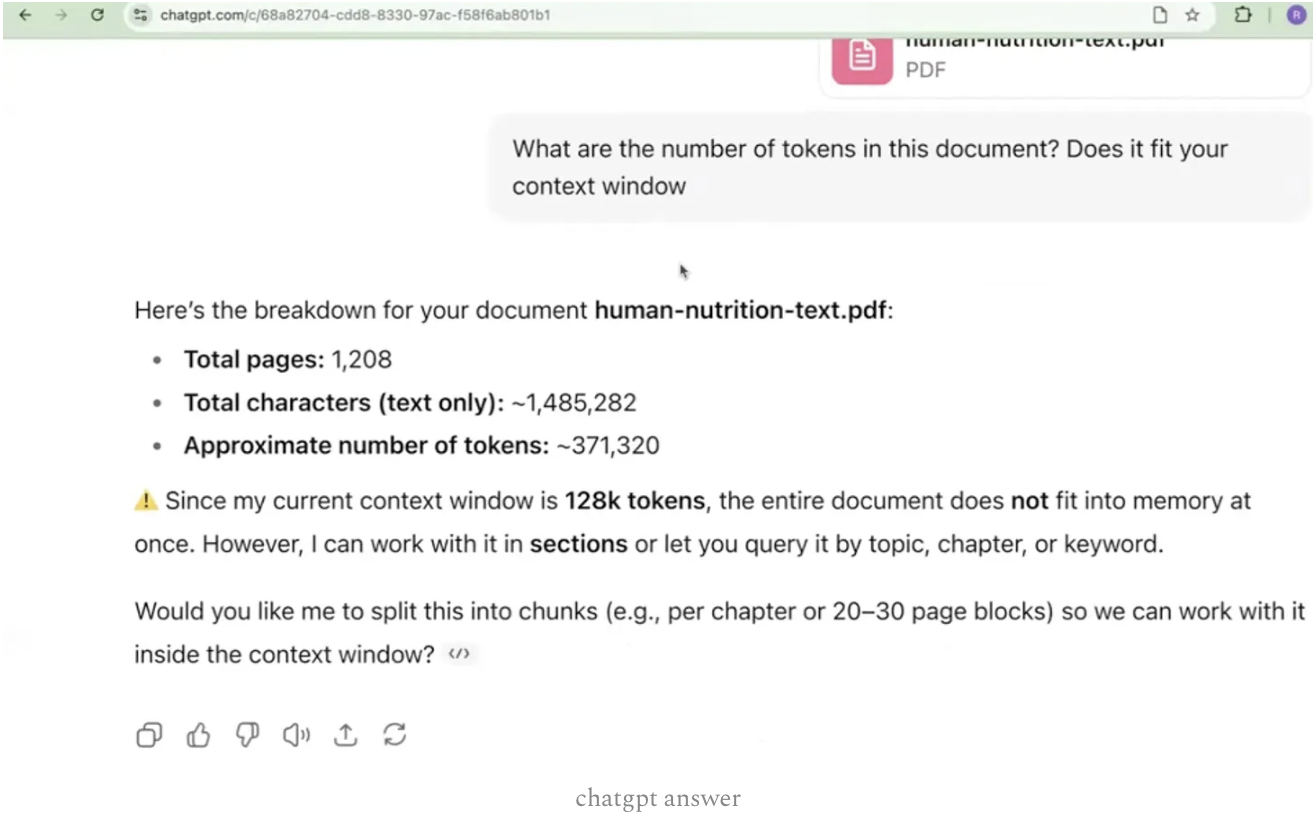

As you can see that ChatGPT was not able to answer as its context window is lesser compared to Gemini. Hence, Google Gemini was able to read and output the question asked.
But here comes the catch: even though LLMs today have massive context windows and can technically “read” huge amounts of text, there are two major limitations that make RAG still essential.
- Cost explodes with large context windows LLMs charge per input + output token. Sending a 200K-token PDF into the model every time is insanely expensive.
- Attention quality drops as context increases LLMs lose accuracy and focus when you overload them. RAG narrows the context → better reasoning.
So RAG is valuable and will be in the future too.
The Four Main Building Blocks of a RAG System
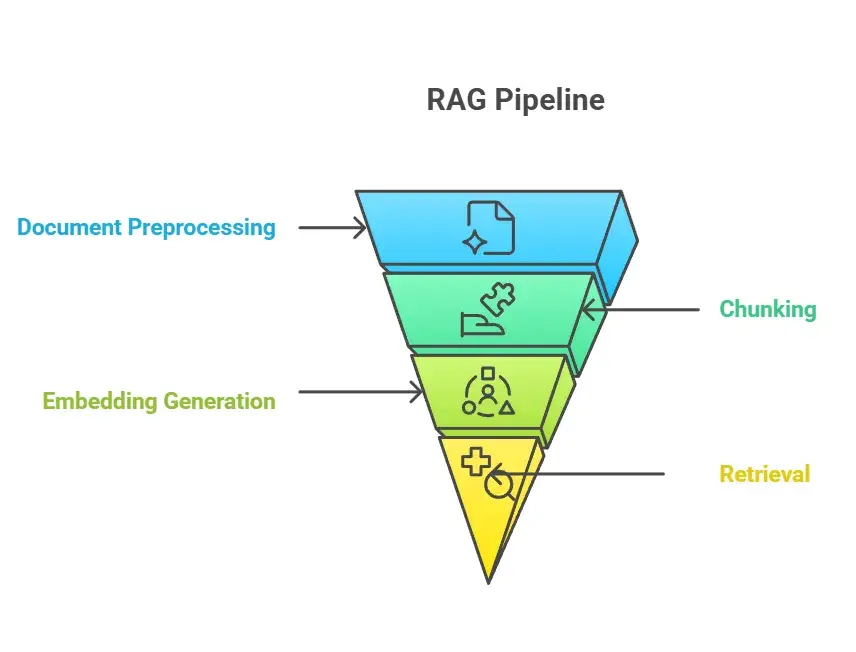
In this article we will talk about document preprocessing that is basically data ingestion, and data chunking and different strategies in chunking. In the next article we will talk about embedding generation and retrieval.
Data Ingestion
Everyone thinks data ingestion is easy, “just upload a PDF and extract text” but there are so many complexities involved in this as well. If given a PDF, where would you store it, how would you parse it? How would you deal with images and tables?
There are some powerful libraries that you should know:
PyMuPDF (fitz)
Best for mixed PDFs (text + images). Extracts:
- text
- images
- metadata
- layout
Docs: https://pymupdf.readthedocs.io/en/latest/
But if a page is just a scanned image, PyMuPDF cannot read text → you need OCR.
OCR using Tesseract
For scanned PDFs or images:
- Reads text from images
- Works for scanned PDFs
- Not ideal for complex tables or multi-column layouts
Repo: https://github.com/tesseract-ocr/tesseract
Docling
Extracts:
- rows
- columns
- table schemas
- layout
- converts everything into clean JSON
Docs: https://docling-project.github.io/docling/
These libraries help you in opening and reading the PDFs, but in some cases when you are dealing with industry level projects, often you do not have the PDFs, you will have to scrape the data from the web. So here are some libraries you would want to know to scrape data from the web.
Firecrawl
Fully crawls:
- websites
- blogs
- documentation
- knowledge bases
And converts them into LLM-ready Markdown.
Docs: https://www.firecrawl.dev/
Puppeteer
Think of it as an automated browser that you can script the same way you would manually click, search, scroll, and interact with web pages. Also lets you scrape only what you want:
<p>tags- headers
- titles
- selected divs
- links to all PDFs
- and even download 500 PDFs automatically
Docs: https://pptr.dev/
Data Chunking
Once your documents are cleaned and extracted, the next question is: “How should I split the text so the LLM can retrieve the right information?”
Chunking matters because:
- too large = irrelevant info
- too small = lost context
- badly aligned = wrong retrieval
There are five chunking strategies, each with specific use cases and each of them have their own pros and cons, let’s discuss all of that in this discussion:
1. Fixed-Size Chunking
Fixed-size chunking divides text into chunks based purely on length, for example, every 200 words or every 500 tokens. It simply chops the text based on size rules, which makes it extremely fast but contextually weak.
Pros:
- Very fast and easy to implement
- Works well for large volumes of short, noisy text
Cons:
- Breaks semantic flow (chunks may start mid-sentence)
- Context can get lost across boundaries
Best For:
- Social media data (reddit, twitter, etc.)
- Logs
- Short, unstructured content where coherence is less important
2. Semantic Chunking
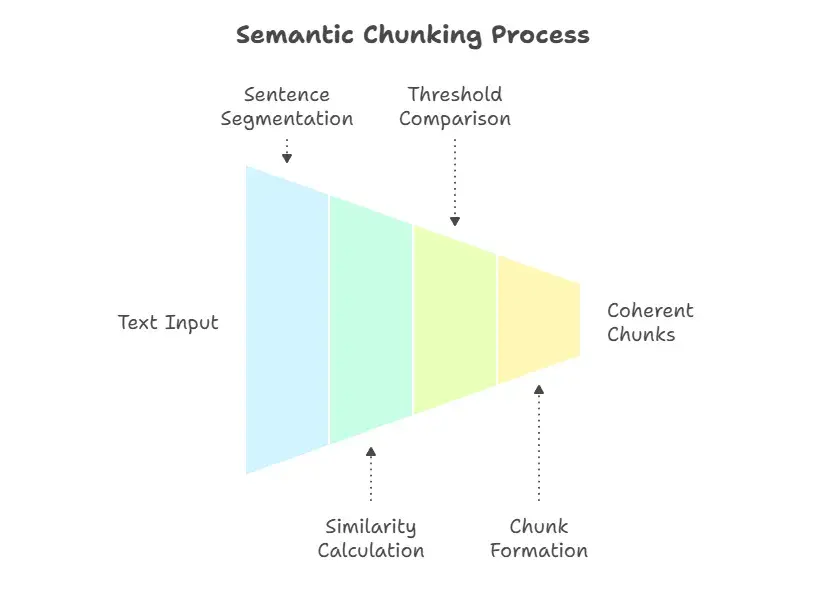
Semantic chunking uses embedding similarity to group sentences that are meaningfully related. Instead of breaking text by size, it breaks based on content. Each sentence is compared to the chunk being built; if it stays semantically similar, it joins the chunk. If it drifts too far than the cosine similarity threshold that we mention then, a new chunk is created.
Pros:
- Produces highly coherent, context-rich chunks
- Great for deep retrieval accuracy
Cons:
- Slow (needs embeddings for every sentence)
- Chunk sizes can vary (some can be tiny, others huge)
Best For:
- Legal contracts
- Policies, compliance docs
3. Structural Chunking
Structural chunking uses the natural format of the document headings, subheadings, sections, tables of contents to define chunk boundaries. It respects the author’s intended organization, making chunks more meaningful and human-readable. Example: by introduction, overview, results, etc.
Pros:
- Very clean, interpretable chunks
- Fast and consistent
- Preserves metadata like titles and sections
Cons:
- Sections may vary widely in length hence chunk sizes can vary immensely
- Not ideal for documents with poor or missing structure
Best For:
- PDFs with headings
- Research papers
- Reports, guides, manuals
- Technical documentation
4. Sliding-Window Chunking
Sliding-window chunking creates overlapping chunks to preserve continuity. Instead of splitting text once, you slide a window across the document. For example, a 500-token window moving forward 250 tokens at a time. This ensures that important context that appears near chunk boundaries is not lost.
Example:
- Chunk 1: tokens 0–500
- Chunk 2: tokens 250–750
- Chunk 3: tokens 500–1000
Pros:
- Maintains continuity across chunk boundaries
- Reduces edge-case information loss
- Improves retrieval for sequential content
Cons:
- Higher storage requirements
- More redundant data to embed and store
Best For:
- Transcripts
- Podcasts
- Dialogue/conversations
- Any long, sequential content
5. Recursive Chunking
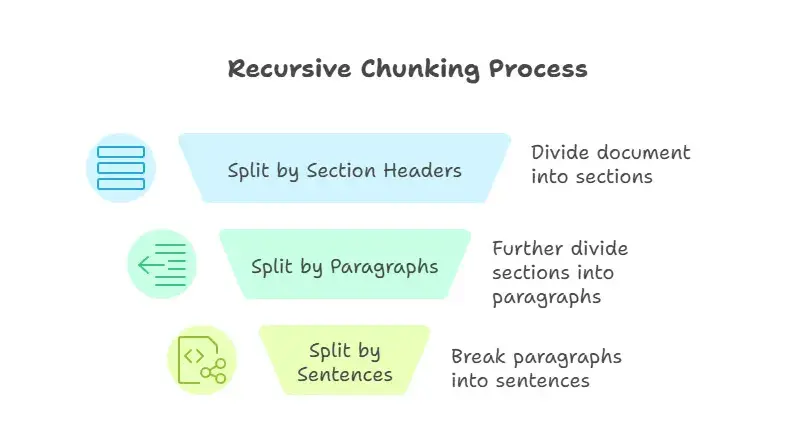
Recursive chunking is a hybrid strategy. It first splits the document using high-level structure (e.g., headings). Then, if any section exceeds a maximum size that we mention, it splits that section again using another method (often fixed-size or semantic). This maintains both structure and consistency.
Pros:
- Produces consistently sized chunks
- Still respects hierarchy and structure
- Ideal for large, messy documents
Cons:
- More complex to implement
- Requires choosing multiple chunking rules
Best For:
- Enterprise-grade RAG
- Long, heterogeneous PDFs
Which chunking strategy to use and when?
You could also refer to this beautiful blog by Weaviate for different chunking strategies and when to chose one over the other, they have some nice visuals Weaviate Article
The most important question to ask is: “Does my data need chunking at all?”
Chunking is designed to break down long, unstructured documents. If your data source already has small, complete pieces of information like FAQs, product descriptions, or social media posts, you usually do not need to chunk them. Chunking can even cause problems. The goal is to create meaningful semantic units, and if your data is already in that format, you’re ready for the embedding stage.
Once you’ve confirmed that your documents are long enough to benefit from chunking, you can use the following questions to guide your choice of strategy:
- What is the nature of my documents?
Are they highly structured (like code or JSON), or are they unstructured narrative text? - What level of detail does my RAG system need?
Does it need to retrieve specific, granular facts or summarize broader concepts? - Which embedding model am I using?
What are the size of the output vectors (more dimensions increases the ability for more granular information to be stored)? - How complex will my user queries be?
Will they be simple questions that need small, targeted chunks, or complex ones that require more context?
How to Optimize the Chunk Size for RAG in Production
Optimizing chunk size in a production setting takes many tests and reviews. Here are some steps you can take:
- Begin with a common baseline strategy, such as fixed-size chunking. A good place to start is a chunk size of 512 tokens and a chunk overlap of 50-100 tokens. This gives you a solid baseline that’s easy to reproduce and compare other chunking strategies against.
- Experiment with different chunking approaches by tweaking parameters like chunk size and overlap to find what works best for your data.
- Test how well your retrieval works by running typical queries and checking metrics like hit rate, precision, and recall to see which strategy delivers.
- Involve humans to review both the retrieved chunks and LLM-generated responses. Their feedback will catch things metrics might miss.
- Continuously monitor the performance of your RAG system in production and be prepared to iterate on your chunking strategy as needed.
Already this article has gone long sorry for that, in the next article we will learn about embeddings and the generation part of it.
Hope you liked this article, and if you liked it please do share it on social media with your friends and followers and Subscribe to my weekly newsletter!
See you in the next one.