Shell Scripting for Devops Beginners: Part 2
November 09, 2025
Series
In the last article, we learned about some of the basic Linux commands. In this blog post, we will cover networking commands, process management commands, loops, and conditional operators in shell scripting, along with some interview questions.
We forgot to cover a couple of basic commands in the first part, so let’s cover that here and then jump to some cool topics.
Also learning about absolute path and relative path, and that’s your homework.
Let’s dive right in.
1. Basic Commands
Let’s look at some basic operators.
> (overwrite) — sends the output of a command into a file, replacing the file’s existing contents.
Example:
echo "hello" > file.txtIf file.txt exists, it erases everything and replaces it with "hello".
If it doesn’t exist, file.txt is created with the content "hello".
>> (append) — sends the output of a command into a file, but adds it at the end without deleting existing content.
Example:
echo "hello" >> file.txtIf file.txt exists, "hello" is added at the bottom.
If it doesn’t exist, it is created with "hello" in it.
We will read about other operators like | (pipe).
2. Networking Commands
lsof -i // To check open ports
ping google.com // To check if a host is reachable
ipconfig // To check IP address
3. Process Management
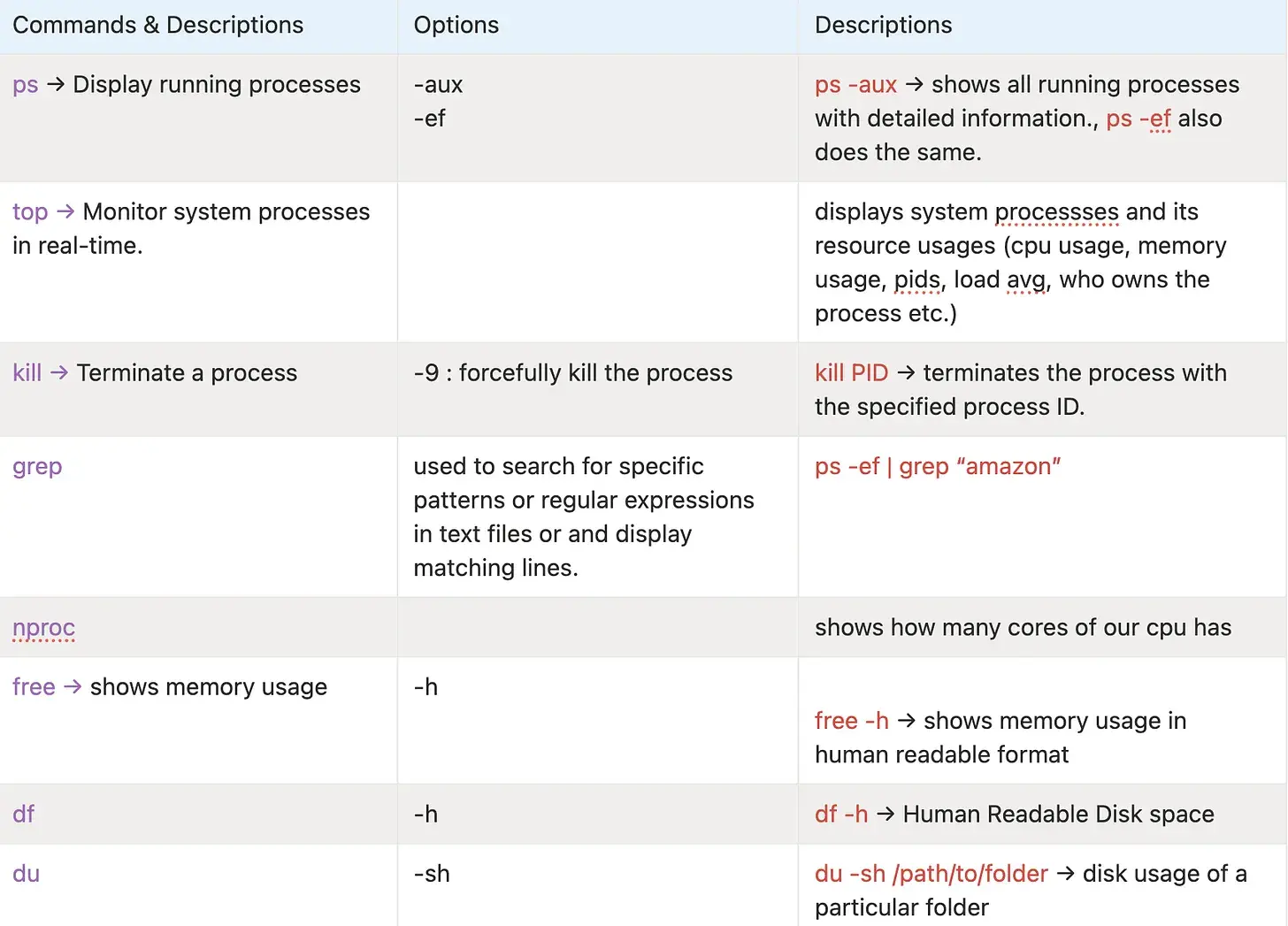
The above commands are very important in day-to-day development, especially when debugging slow systems or tracking down resources with heavy usage.
4. What is pipe (|) parameter?
Pipe parameter is used to send the output of the first command to the second command.
If ps -ef returns all the processes then if we do | grep "google" it will give us the processes matching the given pattern google.
ps -ef | grep "google" // returns all lines which match googleNow, say if you want to retrieve only a specific column after finding the entire matching sentences. Like if you want the pid of the google sentence then what would you do?
ps -ef | awk '{print $2}' // will print every pid of all processes
ps -ef | grep "google" | awk '{print $2}' // prints the pid of only process which have google
What is awk?
awk is a command-line tool and mini programming language for working with text, especially column-based data (like output of ps, df, logs, CSV-ish stuff).
awk 'pattern { action }' file- It reads input line by line.
- Splits each line into fields (
$1,$2,$3, ...). - If the pattern matches, it runs the
{ action }.
Say if I want to print a specific column. For example, show only the 1st column of df -h:
df -h | awk '{ print $1 }'$1→ first column$2→ second column, etc.$0→ whole line
5. Basic Conditions and Loops
To understand this, let’s see some interview questions, so that it will be easier for us to understand how these conditional operators and loops work.
Print numbers from [1, 30] divisible by 3
for i in {1..30}
do
  if [ $((i % 3)) -eq 0 ]
  then
    echo "$i is divisible by 3"
  fi
done
Without $(( )) bash will treat numbers as plain text, not math.
Variable usage
name="pradyumna"
echo $name
[ ] is used for conditional checks.
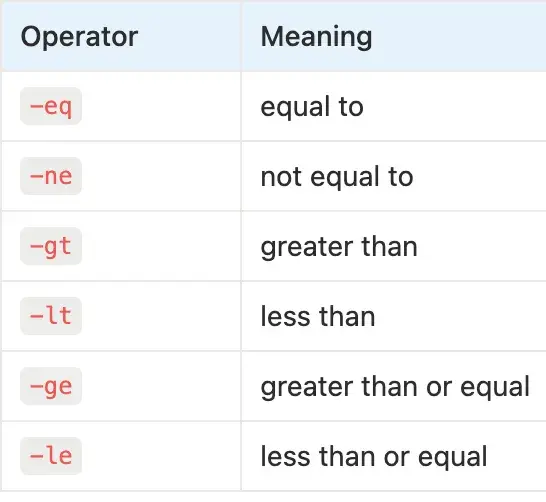
x=1
while [ $x -le 10 ]
do
  echo "Number: $x"
  x=$((x + 1))
done
Print the number of S in MISSISSIPPI
echo -n 'MISSISSIPPI' |    // print the word (no newline)
grep -o 'S' |              // extract every S and print one per line
wc -l                      // count how many lines = number of S's
Sort a file alphabetically
sort file.txtAnd that’s a wrap. That brings us to the end of the Shell Scripting for DevOps Beginners series.
These concepts are fundamental for DevOps, SRE, Cloud, and Backend roles.
If you found this article helpful, please consider sharing it with your friends. And if you want more such content delivered straight to your inbox, make sure to Subscribe to my weekly newsletter!