Understanding AI Agents
Overview
AI agents have become a core building block of modern AI systems, but the term is used in many different context. This post breaks down what AI agents actually are, how they differ from traditional workflows, and how agentic systems are designed in practice. We cover the key building blocks including LLMs, tools, and memory, and how they enable agents to reason, act, and adapt over time.
The focus is on patterns. These are common ways to structure workflows, single-agent systems, and multi-agent architectures. Some patterns favor control and predictability, while others emphasize autonomy and dynamic decision-making. Understanding these trade-offs helps in choosing the right architecture for a given problem.
By the end, you’ll have a practical mental model for agentic workflows, memory-aware agents, and multi-agent systems. You will know when to use them, how they fit together, and where they tend to break down.
What are AI Agents?
Before we directly jump into the definition of AI Agents, let's first understand AI Agents with the help of an example.
Let's say you are planning to go on a trip with your family to Dubai. You are taking the entire responsibility of the trip, so how would you plan it? What are the things you would think about?

So the list of things to plan for the trip would be:
- Travel (flights)
- Stay (hotels)
- Food (restaurants)
- Itinerary planning (which day to go where)
- Local transportation (cars, public buses, trains, etc.)
- Budgeting
- Visas
Now, after listing the things, we need to take action. You go ahead and book flights, book hotels, get visas, etc.
But what would your thought process be like?
You wouldn't just search "Dubai" once. You would:
Research: browse multiple websites for flights, compare prices, and book. Similarly for hotels, you would pick one near the places you want to visit with good reviews.
Reason: if we land at 4:00 AM, we need a hotel that allows early check-in.
Execute: book the flight (handling the payment), then use that to book the hotel, and then use that confirmation to book the car.
Adapt: if a flight is canceled, you have to re-adjust all the reservations like the hotel, the dinner reservations, etc.
If you use a traditional LLM, it’s like having a Travel Brochure. You ask it "What are the best hotels in Dubai?" and it gives you a list. But you still have to do all the work, the booking, the timing, and the fixing when things go wrong.
An AI Agent, however, is like having a Digital Travel Assistant as it is able to Research, Reason, Adapt, Execute and Remember at each step.
You give it a Goal: "Plan and book a 5-day family trip to Dubai within a $5000 budget." and it entirely acts and executes the entire process and planning that we talked about.
This is often referred to as Agentic AI. Hope this example gave a fair understanding of what Agents are. But there is lot more to it.
In this course Agentic AI by Andrew Ng, he starts by asking
how do humans actually work compared to LLMs?
Most current LLM applications typically operate in a linear fashion, one-shot workflow (prompt → output). But that’s neither efficient nor realistic for building applications that involve multiple steps.
But as humans, we rarely create a polished final product in a single attempt. Our work usually flows through non-linear steps (sometimes can flow through linear steps as well), just like when we write an essay; brainstorming, researching, drafting, editing and refining, or like in our example finding flights in our budget, finding hotels in our budget that are nearby to the places we want to see, but also has good reviews etc.
By Linear and Non-linear steps i mean that :
Linear steps are when work flows in a straight line: you finish Step 1, then Step 2, then Step 3, and you rarely need to go back. Example: Book flight → Pay → Get confirmation (done).
Non-linear steps are when work loops and bounces between steps because each decision changes the constraints. You keep revisiting earlier choices until everything fits together. Example: Flight timing affects hotel check-in → hotel location affects itinerary → itinerary affects budget → budget forces you to change flights/hotels again.
So trip planning is mostly non-linear because changes in one part (flight cost, timing, cancellation, review score) force updates in other parts, it’s an iterative loop, not a one-shot pipeline.
So apps can be just simple ai agentic workflows, or could involve real ai agents.
Agents vs Workflows
So this brings us to the definition of Workflows and Agents :
As per Google:
Agentic Workflows:Workflows are more deterministic, and are more focussed on the tasks that are predefined at hand.
AI Agents: AI Agents have agency, which can make and take decisions inorder to accomplish the goal or outcomes, meaning they are highly autonomous, and they have the ability to do complex task automations as they have access to tools. They learn from their environment, and retains memory
Here's how Anthropic defined the 2 for us, and maybe you could get a better understanding :
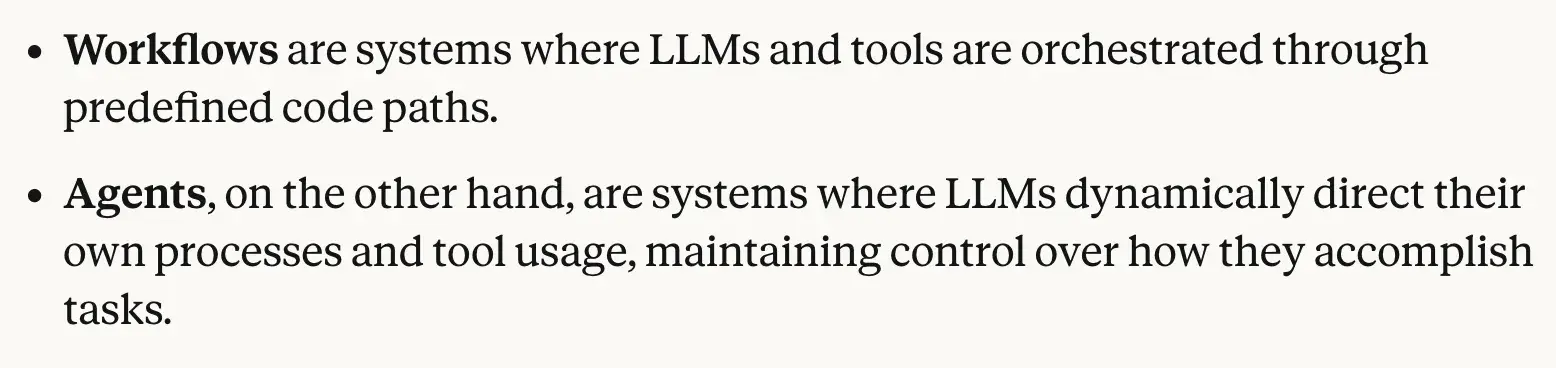
Some major things to consider is that if you are building an agentic agent, then you may have less control over the decision it makes, because the agent might not make the decisions that you as a human might make in certain circumstances.
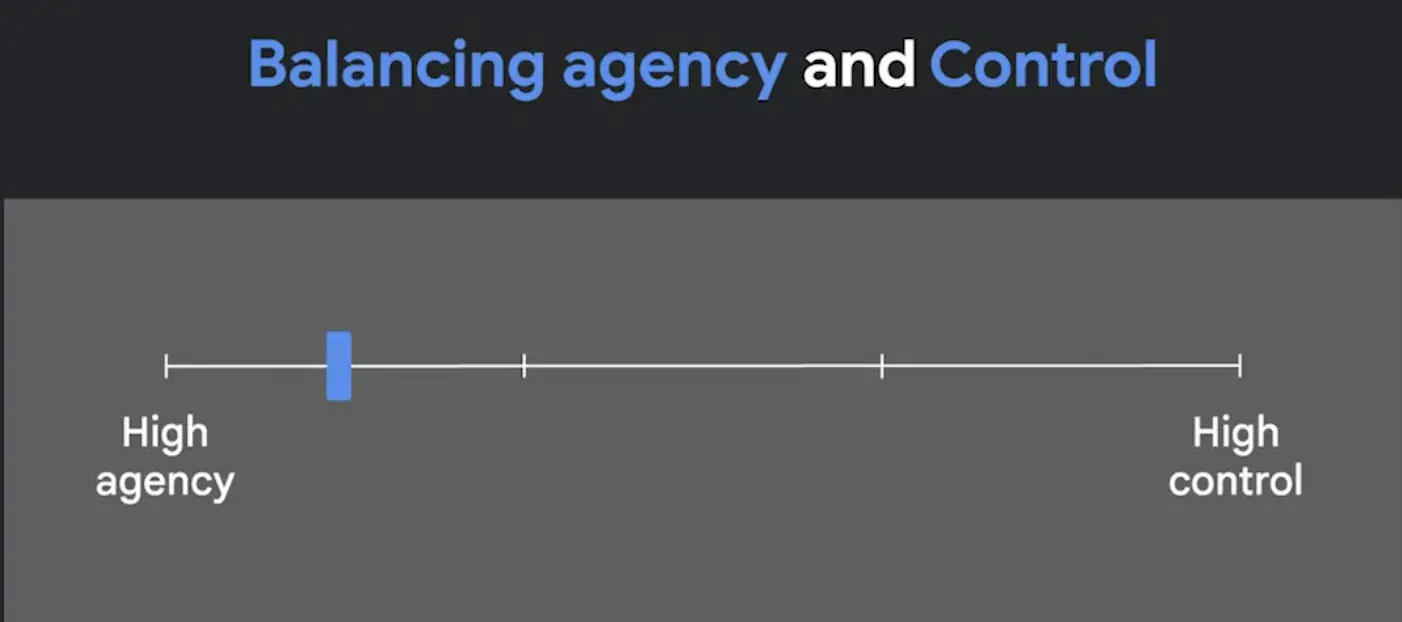
Where as in Agentic workflows, where we are intentionally putting humans in the loop, and asking it to follow a deterministic approach sounds better in certain cases.
So high agency and high control are 2 opposite ends of the spectrum.
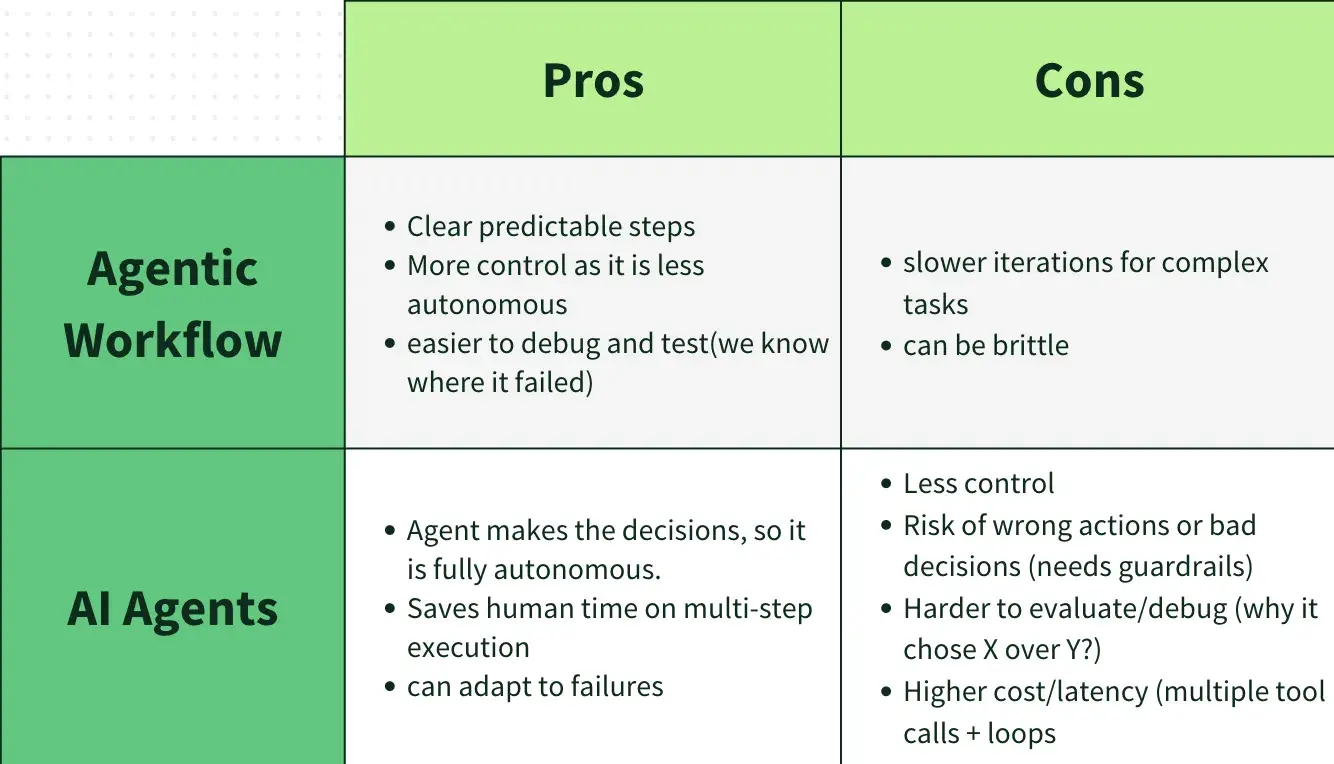
Pros and Cons in Agentic Agent vs Agentic Workflow
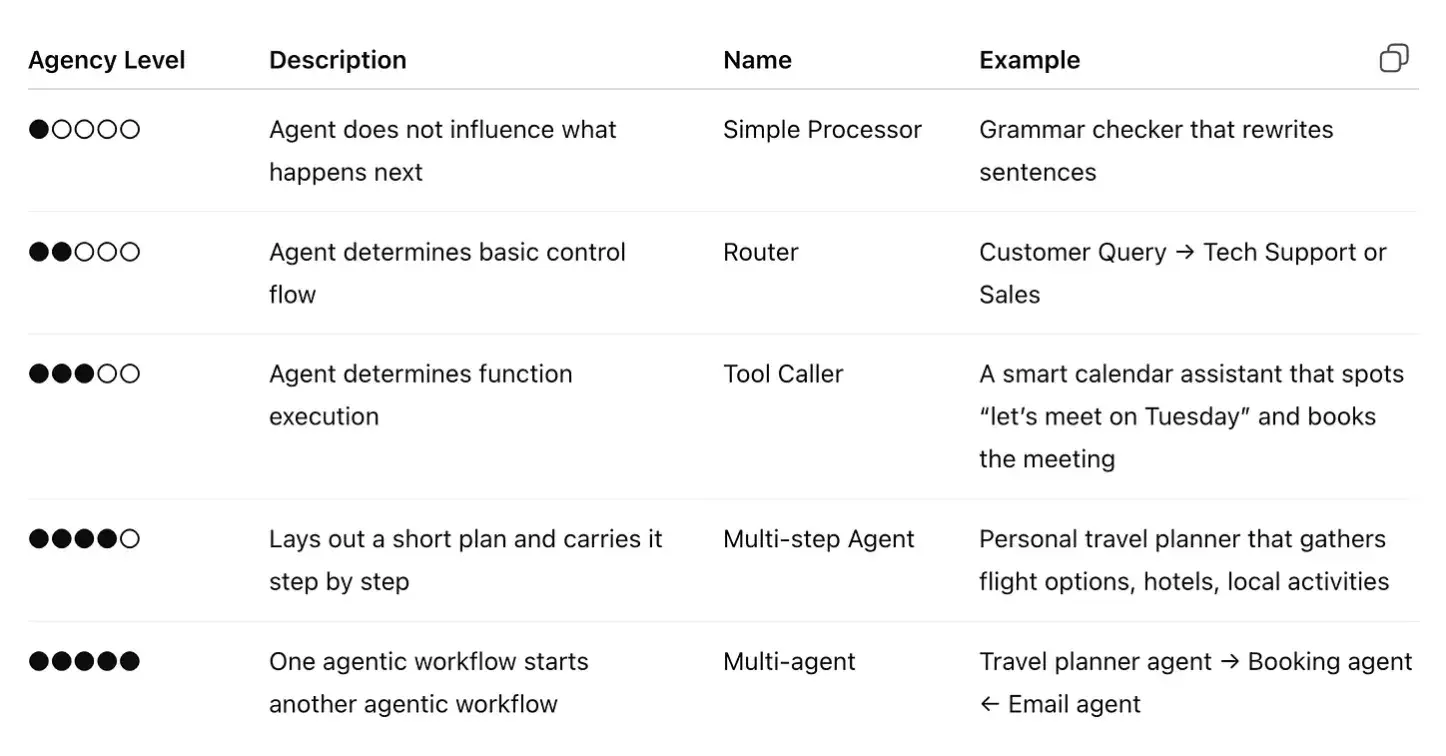
The level of control or autonomy an agent has is called “agency”.
Lower the agency, lower is the value created by an agent, and more control
Higher the agency, higher is the value created by and less control.
When (and When Not) to Use Agents?
Its super important to know when to consider building an agntic workflow and when to rely on ai agents.
If you know that the solution to your problem requires a step by step approach, then a simple workflow would suit best.
The major trade off between Ai Agents and a workflow is that , AI Agents can prove to have better performance and lesser manual work when dealing with complex, ambiguous and dynamic tasks but the downside is that it increases latency and ofcourse more the computational cost. And it introduces unpredictability and potential errors. Agentic systems must incorporate robust error logging, evaluation strategies, exception handling, and retry mechanisms.
Use workflows for predictability and consistency when dealing with well-defined tasks where the steps are known.
Use agents when flexibility, adaptability, and model-driven decision-making are needed.
Building Blocks of AI Agents
The basic building blocks of an AI Agents is an LLM which is augmented with certain super-powers.
- LLMs :Brain of AI Agents which is responsible for making decisions
- Tools :Weapons that extend the Agents capabilities, more like external functions or APIs the agent use to take action
Memory : The agent’s “notebook” (short-term + long-term) that stores context like user preferences, past interactions, and key facts, so the LLM can stay consistent and make better decisions across steps and future sessions.
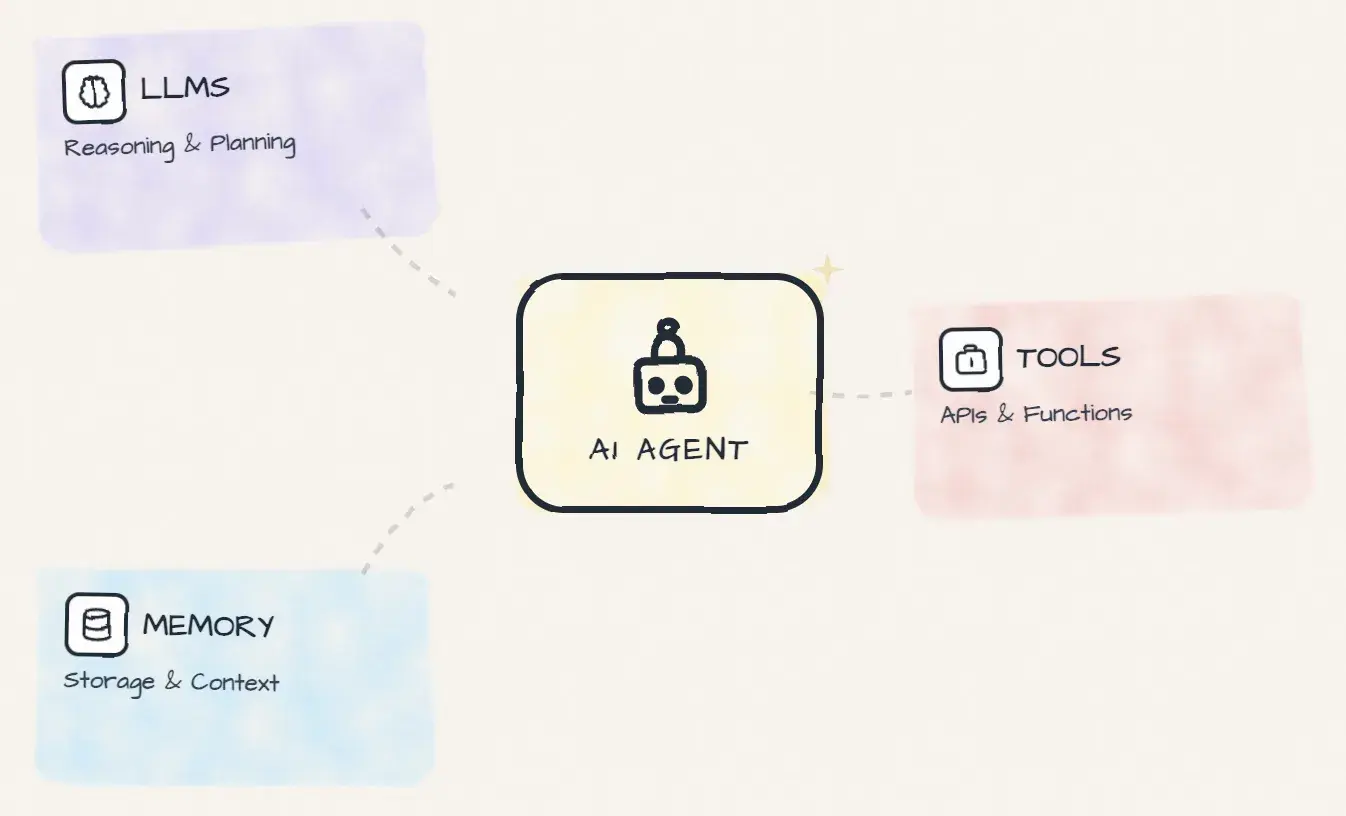
LLMs
A large language model (LLM) on its own can only read and generate text, it has no direct access to the internet, APIs, databases, or other external systems.
It is just limited to knowing training data. LLMs can’t know events that happened after their training cutoff, nor does it know about your internal data on which the LLM has not been trained.
But there are so many LLM models available, so which one to choose ?
Choose the LLMs smartly, not every task needs the most smartest model, if your task/subtask is of less complexity, then go for smaller models. Choosing the right model for the task at hand helps reduce cost.
Now let's understand how these 'Next-word predictors' get superpowers via tools.
Tools
In the world of AI agents, tools are like weapons that extend an agent’s capabilities to do additional tasks.
Tools can come in various forms, for example :
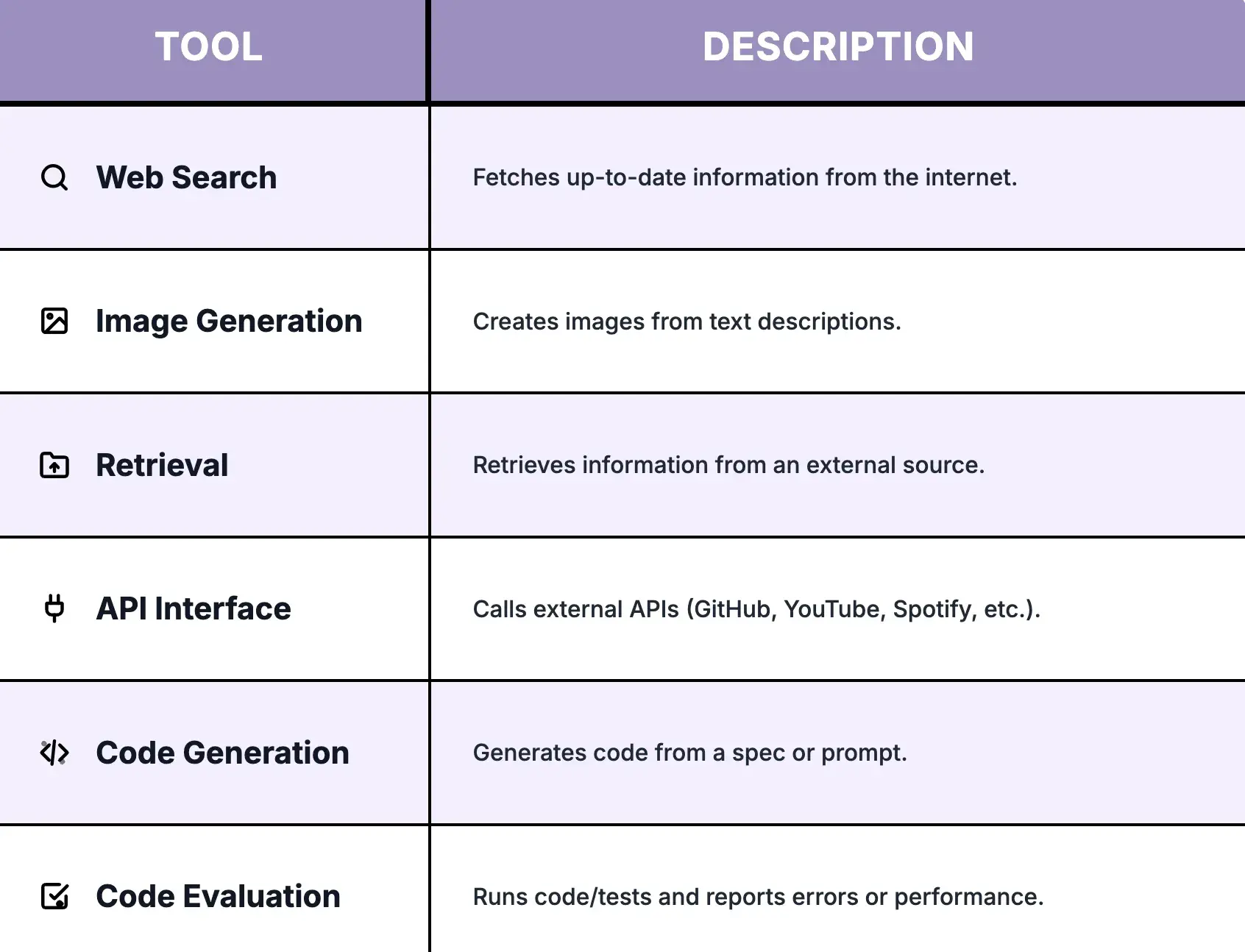
If a tool doesn’t exist, we can build a custom tool (a function or API wrapper). We can expose these tools through standards like MCP, and we can also add a retrieval tool for RAG (searching internal docs / vector DB) so the agent can fetch grounded context.
How do you pass the 'tool' to the LLM ?
Prompt is the way. Yes prompt is the way you pass the tools to an LLM. Because LLM's can only understad text, you give it an input, and it gives an output.
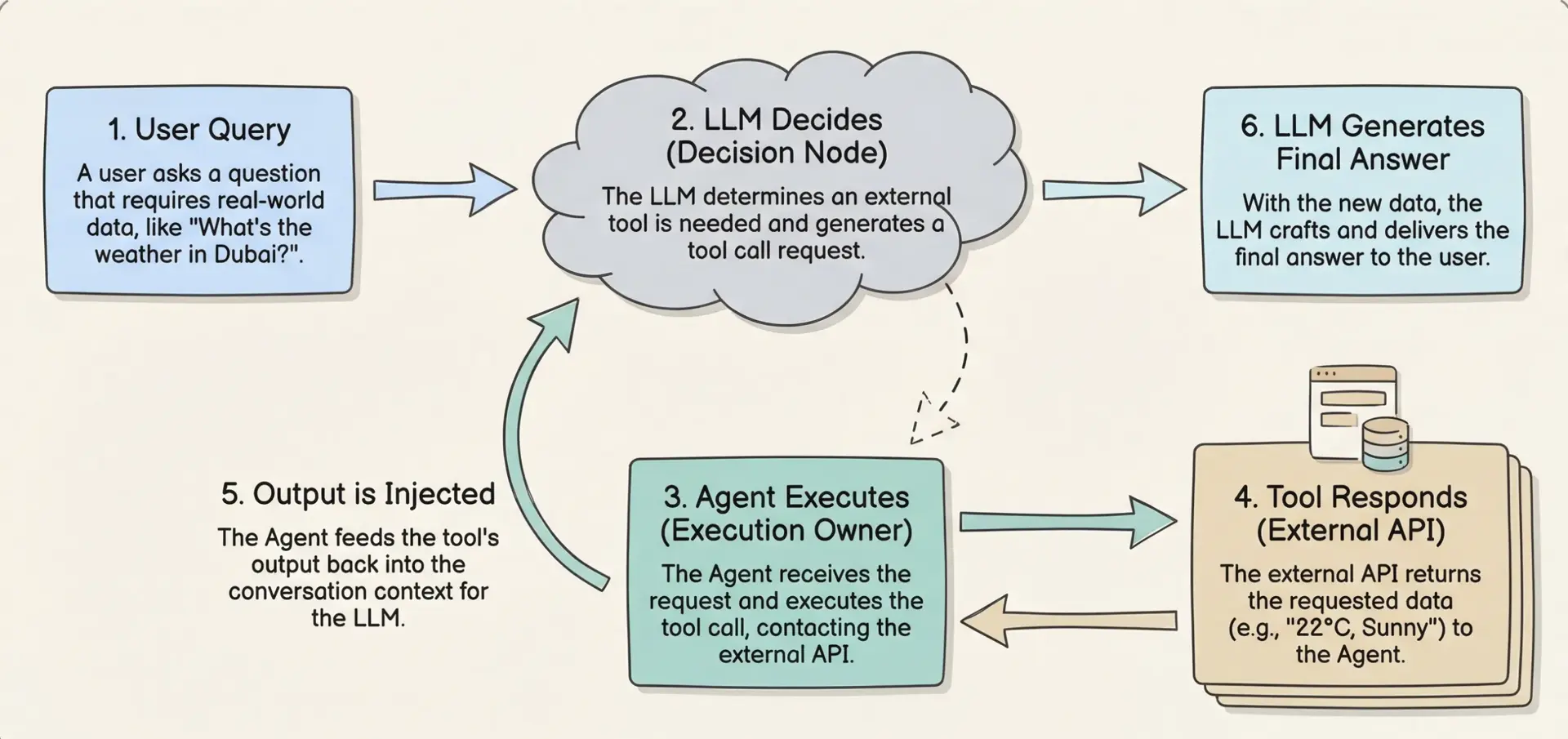
For example, if we provide a tool to check the weather at a location from the internet and then ask the LLM about the weather in Dubai, the LLM will recognize that this is an opportunity to use the “weather” tool. Instead of retrieving the weather data itself, the LLM will generate text that represents a tool call, such as call weather_tool(‘Dubai’).
The Agent then reads this response, identifies that a tool call is required, executes the tool on the LLM’s behalf, and retrieves the actual weather data.
These Tool-calling steps are typically not shown to the user as they are mostly abstracted away by the frameworks. the Agent then appends the result from the function call as a new message before passing the updated conversation to the LLM again.
The LLM then processes this additional context and generates a natural-sounding response for the user. From the user’s perspective, it appears as if the LLM directly interacted with the tool, but in reality, it was the Agent that handled the entire execution process in the background.
 Example image of how prompt can be formatted:

Tool Registry Pattern
In a real agent, you organize tools into a registry or "toolbox".
const toolbox = new ToolRegistry();
toolbox.register(weatherTool);
toolbox.register(calculatorTool);

const agent = new Agent({ tools: toolbox });
When to provide the LLM with tools is that :
- If an LLM is not good at doing mathematic operations, then you give it the calculator.
- If the LLM cannot find latest info, provide it with a web search tool.
- If the vanilla LLM is struggling to find the weather, then the tool we give is a weather Api.
Memory in Agents
If the LLM is the brain and the Tools are the hands, then the memory is the second brain of the system.
Without memory the agent would start fresh each time, losing all its context from previous interactions. No context. No personalization.
Imagine hiring a top chef who forgets everything the moment they leave the kitchen. they forget the recipe, the customer’s preferences, and even what they cooked five minutes ago. Every time you want a dish, you have to explain the recipe and preferences again. That’s how most agents work today: powerful, but stateless.
LLMs can only look at a limited amount of information at once. That limited space is called the context window. It’s basically the model’s short-term working space for the next response.
So we can’t dump everything into the prompt and hope it works. Too little context and the model misses key details. Too much (or irrelevant) context increases cost, slows responses, and can even reduce quality by adding noise or contradictions.
The goal is to pass just the right information for the next step not too little, not too much. This is what people call Context Engineering, and we’ll go deeper into it in a dedicated section.
And this is exactly where memory becomes powerful: memory stores the important stuff outside the context window (past conversations, preferences, decisions, notes), and we retrieve only what’s relevant and place it back into the context window when needed.
With memory the agent can remember past conversations and take actions as per the context from previous conversations, hence producing more detailed and cohesive responses.
The benefits of using memory in agents include : deep personalization, continuity, complex reasoning and imrpoved efficiency.
Memory is a fundamental part of the framework, with a vector databases (such as Pinecone, Weaviate, Chroma, etc.) providing robust storage and retrieval mechanisms for task-related data.
Thanks to Leonnie Monigatti for this image :
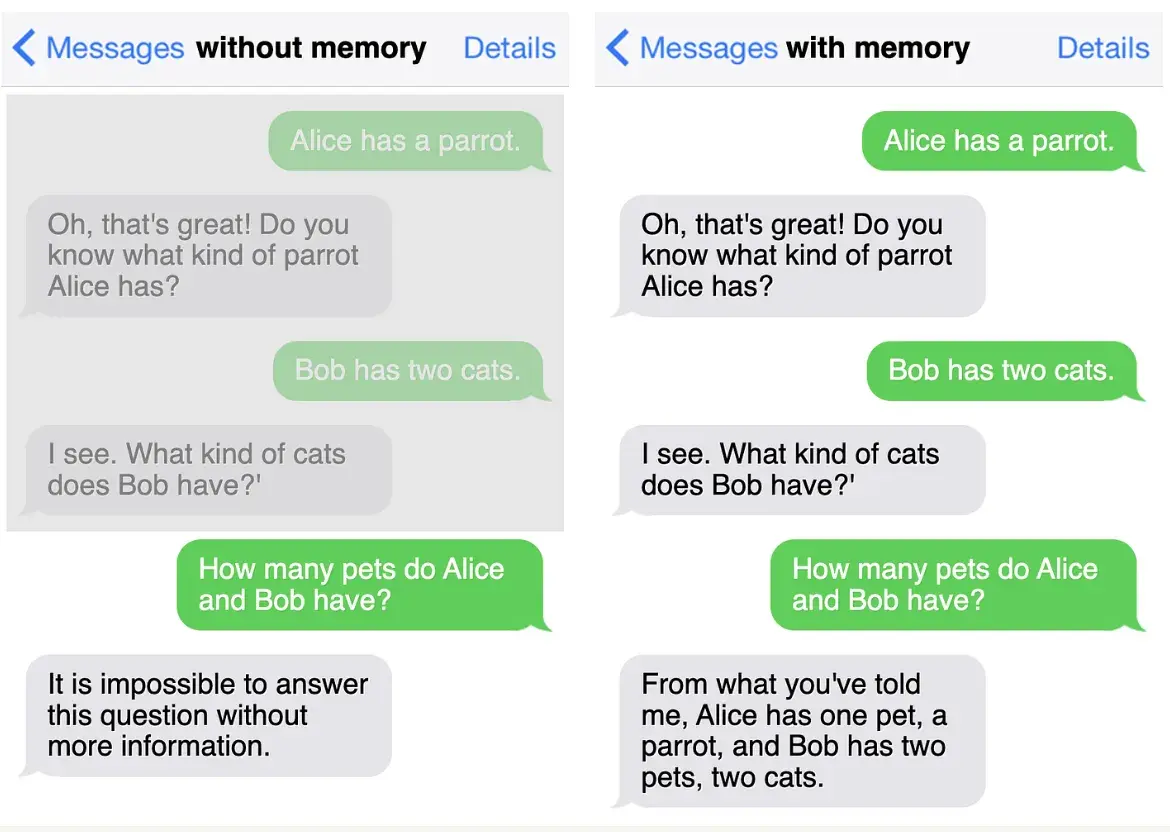
So since LLMs lack memory, so a memory has to be added into our architecture. And we can do that in 2 ways:
Short-term Memory (STM)
Short-term memory lives inside the context window. It holds temporary information needed for the next few steps (recent messages, tool outputs, or a running summary/state). It is session-scoped and gets cleared or compressed over time.
from langchain.memory import ConversationBufferWindowMemory

# Short-term memory: keep last K messages (windowed buffer)
memory = ConversationBufferWindowMemory(
    k=5,  # keep last 5 exchanges
    return_messages=True
)

# Track session conversation (example structure)
conversation = [
    {"user": "Hi", "assistant": "Hey! How can I help?"},
    {"user": "What's the weather in Tokyo?", "assistant": "Let me check..."},
]

for turn in conversation:
    memory.save_context(
        {"input": turn["user"]},
        {"output": turn["assistant"]}
    )

# Get session history (list of message objects)
history = memory.chat_memory.messages
print(history)
Long-term Memory (LTM)
Long-term memory lives outside the LLM, usually in an external store (often a vector database). It lets an agent save and reuse information across days, weeks, or separate conversations. That’s how you get real personalization and continuity over time. When the agent needs it, it retrieves the most relevant memories (semantic search + retirval) and injects them into the LLM’s short-term memory (context window) for the current step.
from langchain_openai import OpenAIEmbeddings
from langchain_postgres import PGVector
from langchain.schema import Document

# Vector DB long-term memory (semantic)
conn = "postgresql+psycopg://user:pass@localhost/db"
collection = "agent_memory"

vectorstore = PGVector(
    connection=conn,
    collection_name=collection,
    embeddings=OpenAIEmbeddings()
)

# Write memory
vectorstore.add_documents([
    Document(page_content="User prefers concise answers", metadata={"type": "preference", "user_id": "user_123"})
])

# Read memory (semantic retrieval)
memories = vectorstore.similarity_search(
    "What style of answers does the user like?",
    k=3,
    filter={"user_id": "user_123"}
)
print(memories)
This Long term memory can be broken down into 3 types:
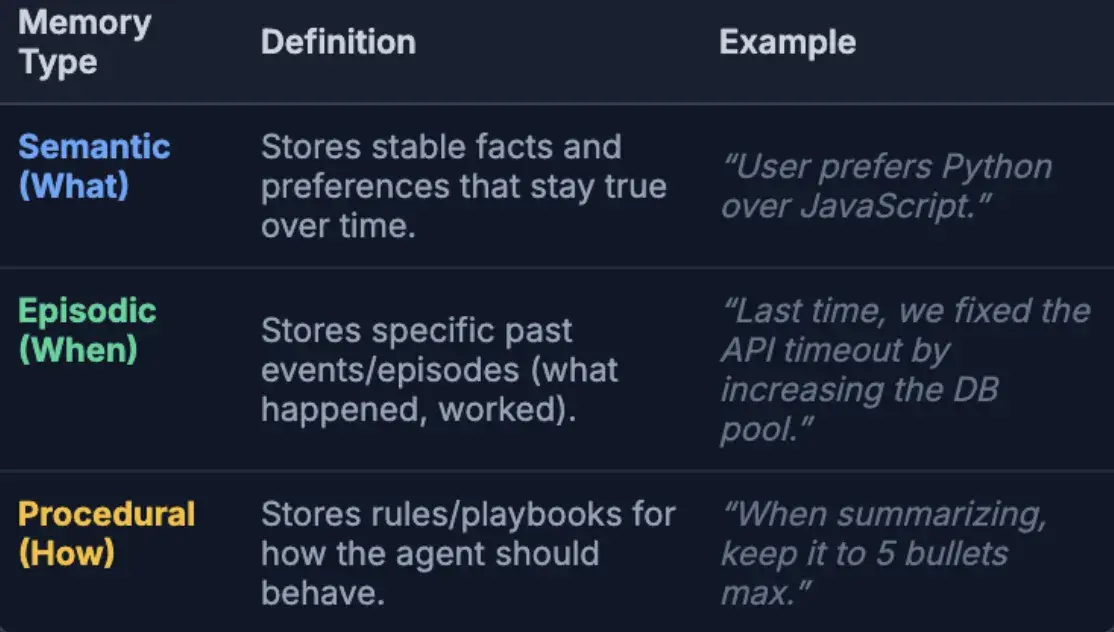
Now that we’ve seen short-term memory (context window) and long-term memory (external storage), the next question is:
how do we manage both without adding noise or wasting tokens?
Memory management in AI agents simply means:
- what information we keep inside the LLM’s context window,
- what information we store outside the LLM (long-term memory),
- and how we move the right information between them at the right time.
Managing memory in the context window
The goal is to keep only the information that is useful for the next steps. If the context window contains wrong, irrelevant, or conflicting information, the model can get confused.
Also, as a conversation gets longer, the prompt gets bigger (more tokens). That increases cost, can slow responses, and can even hit the context window limit. Andrej karpathy summarizes this well in this tweet.
To avoid this, you can manage the conversation history in a few ways:
- remove old or no-longer-relevant messages,
- or summarize earlier parts and keep only the summary, then drop the older messages.
That’s how we manage short-term memory (the context window). Next, let’s see how agents update long-term memory in other words, how they write memories.
So how does the agent actually write to the external long-term memory ??
LLMs can’t write to a database by themselves. They only generate text.
So the “writing” happens because the agent system (your app) gives the LLM a
memory tool (ex: save_memory()), and the LLM decides when to use it.
When it triggers that tool, the system stores the memory in an external store
(vector DB / key-value DB / SQL), and later retrieves it back into the context window when needed.
Explicit memory / Hot path write
The agent identifies that something is important during the conversation and saves it immediately using tool calling (ex: “User prefers Python” →save_memory()). This updates long-term memory right away, so it can be used in the next turn.Implicit memory / Background write
The agent responds first, and a background process later summarizes/extracts useful facts and writes them to long-term memory. This avoids latency, but the memory may not be available instantly for the next message.
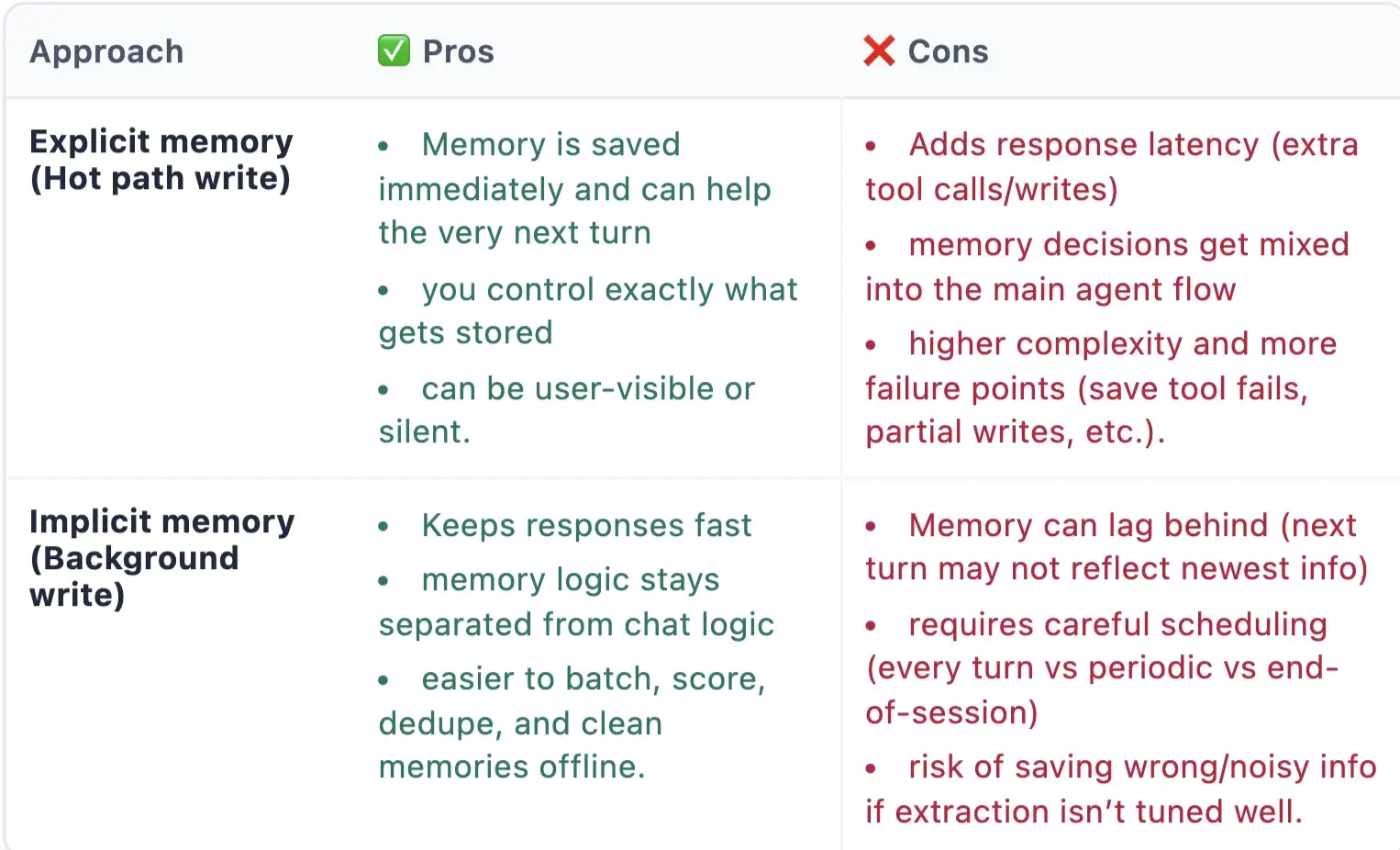
But how does the agent know what’s “important enough” to save in the hot path?
It doesn’t magically know. You teach it a memory policy a short set of rules that tells the model what is worth saving
and what must never be saved. Then you give the model a memory tool (for example save_memory(text, type, confidence)).
If the current message matches the policy, the model triggers the tool call, and your app writes it to the external store.
In practice, agents use a few simple signals to decide:
- Stability: Will this still be true next week? (preferences, profile facts, decisions)
- Reusability: Will this help future answers or tasks?
- Impact: Does it change how the agent should respond next time?
- Confirmation: Did the user clearly commit to it? (“From now on…”, “Always…”, “We decided…”)
A good rule of thumb: if it’s not likely to matter in a future session, don’t store it.
A tiny memory policy example:SYSTEM_PROMPT = f"""
You are an AI agent.
MEMORY POLICY:
Save only stable, reusable info (preferences, key profile facts, ongoing project details, confirmed decisions).
Never save temporary chatter, raw transcripts, or sensitive data (passwords, OTPs, tokens, private keys).
If unsure, do not save.
If something should be saved, call: save_memory(text, type, confidence)
"""
messages = [
{"role": "system", "content": SYSTEM_PROMPT},
{"role": "user", "content": user_message},
]
result = llm.chat(messages=messages, tools=[save_memory])
We talked about how LLMs know about the tools, but now in the next section, lets discuss about how these LLMs learnt and take decisions, and how they interact with the environment and memory.
ReACT framework
'Re' stands for reasoning, and 'Act' stands for action. This framework will help the agents interact with the external environments, and help them to plan and reason.
This approach is all about combining the LLM’s reasoning ability with tool use in a single, coherent loop.
To understand why ReAct is needed, let’s first recall Chain-of-Thought (CoT) prompting.
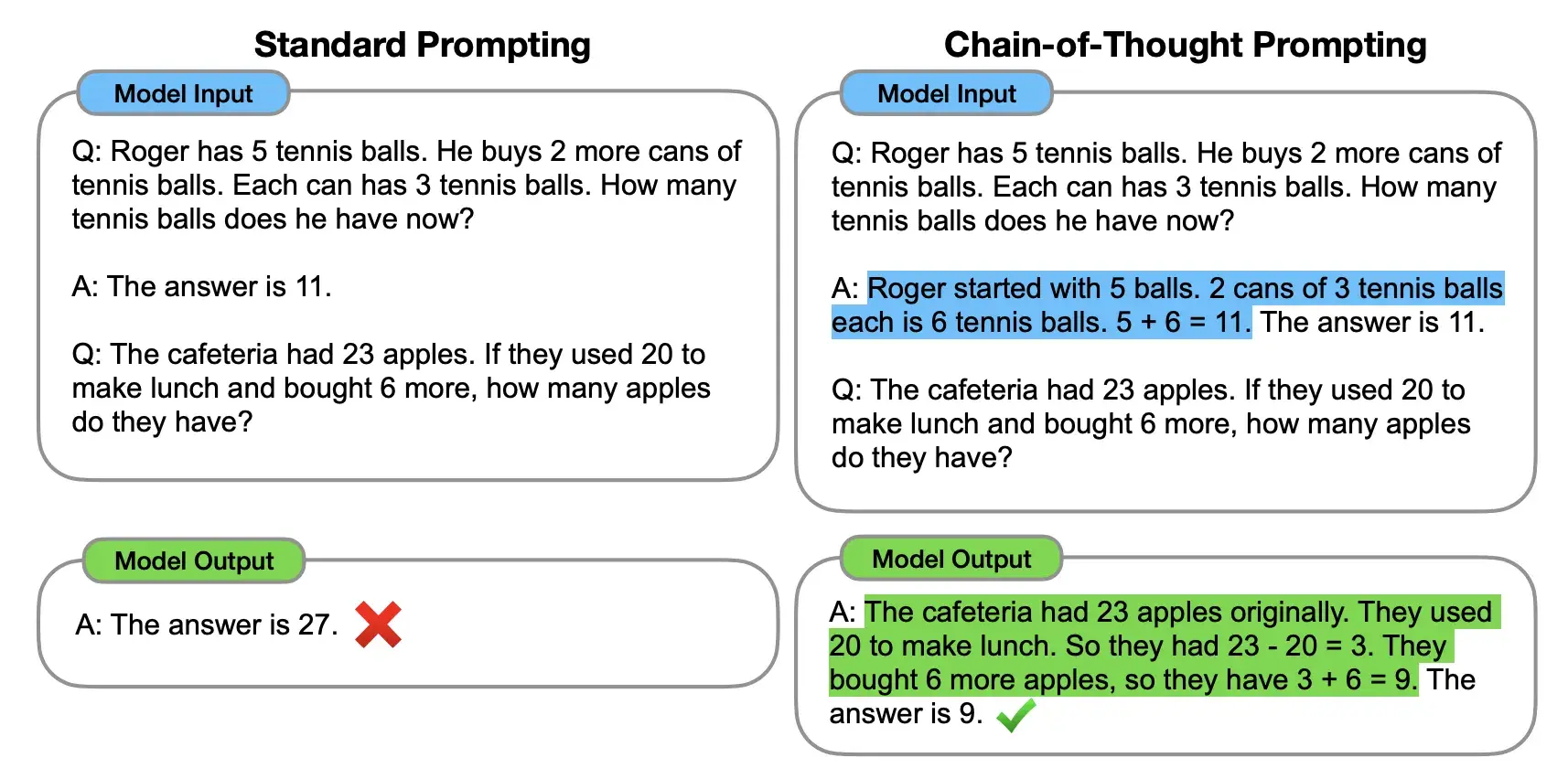 Comparison between standard prompting and CoT prompting. On the left, the model is instructed to directly provide the final answer (standard prompting).
On the right, the model is instructed to show the step by step reasoning process to get to the final correct answer (CoT prompting).
Comparison between standard prompting and CoT prompting. On the left, the model is instructed to directly provide the final answer (standard prompting).
On the right, the model is instructed to show the step by step reasoning process to get to the final correct answer (CoT prompting).
As we can observe, writing a chain of thought a series of intermediate reasoning steps helps the model in outputting the correct answer. This this Wei et al. (2022) highlighted how guiding a model through a series of intermediate reasoning steps significantly improved its performance on tasks such as mathematical problem-solving, logical reasoning, and multi-hop question answering.
But the COT has a limitation, and that is it cannot have access to the external world, So it cannot take actions. That's where ReACT comes in.
And how ReACT does that is using TAO Principles.
Thought -> Action -> Observation -> repeat
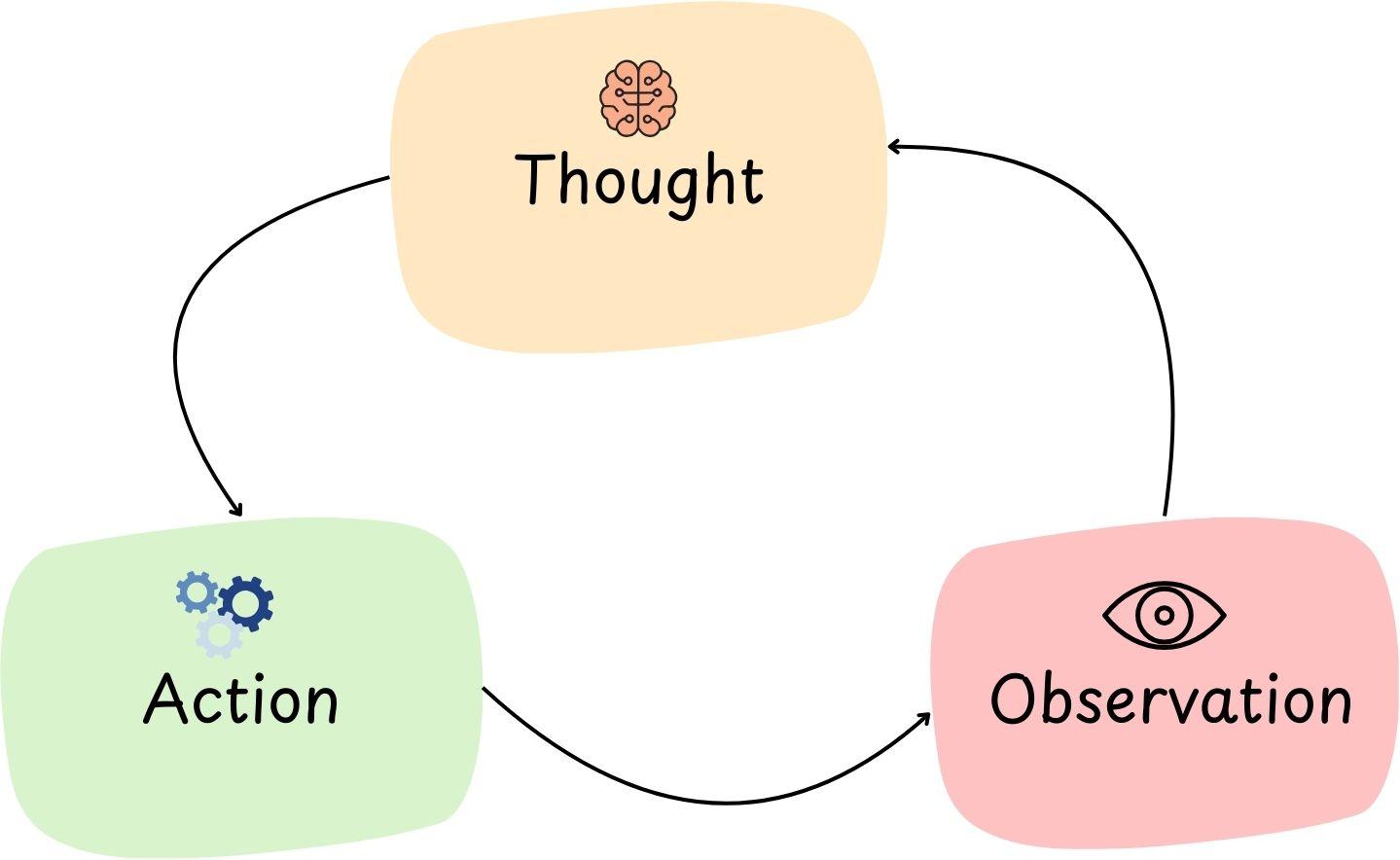
The Thought-Action-Observation (TAO) loop is the heartbeat of the ReAct agent.
It’s the cycle that lets an agent iteratively approach a solution. Here’s the breakdown of each phase:
Thought: The agent’s LLM “thinks” about what to do next. This is a reasoning step, like planning or analyzing the problem state. For example: “Hmm, to answer this question I might need data X; perhaps I should use tool Y to get it.”
Action: Based on that thought, the agent takes an action by invoking a tool. E.g., Action: call the search tool with query “data X”.
Observation: The agent then gets the result of that action – new information from the tool. E.g., the search results come back with a relevant snippet. The agent observes this and incorporates it.
This loop breaks only when the final answer is found.
t’s essentially a feedback loop for problem solving. So during the loop, if something goes wrong, or a new requirement comes up, then it should think observe and take action and pivot accordingly.
Example code:
# Create the ReAct template
react_template = """Answer the following questions as best you can. You have access to the following tools:

{tools}

Use the following format:

Question: the input question you must answer
Thought: you should always think about what to do
Action: the action to take, should be one of [{tool_names}]
Action Input: the input to the action
Observation: the result of the action
... (this Thought/Action/Action Input/Observation can repeat N times)
Thought: I now know the final answer
Final Answer: the final answer to the original input question

Begin!

Question: {input}
Thought:{agent_scratchpad}"""

prompt = PromptTemplate(
    template=react_template,
    input_variables=["tools", "tool_names", "input", "agent_scratchpad"]
)
For this to work, Memory is super important, for memory of previous interaction in the loop. Without memory, the agent would forget what happened in the previous interaction. hence choosing the memory as per the use-case becomes super important.
Agentic Frameworks
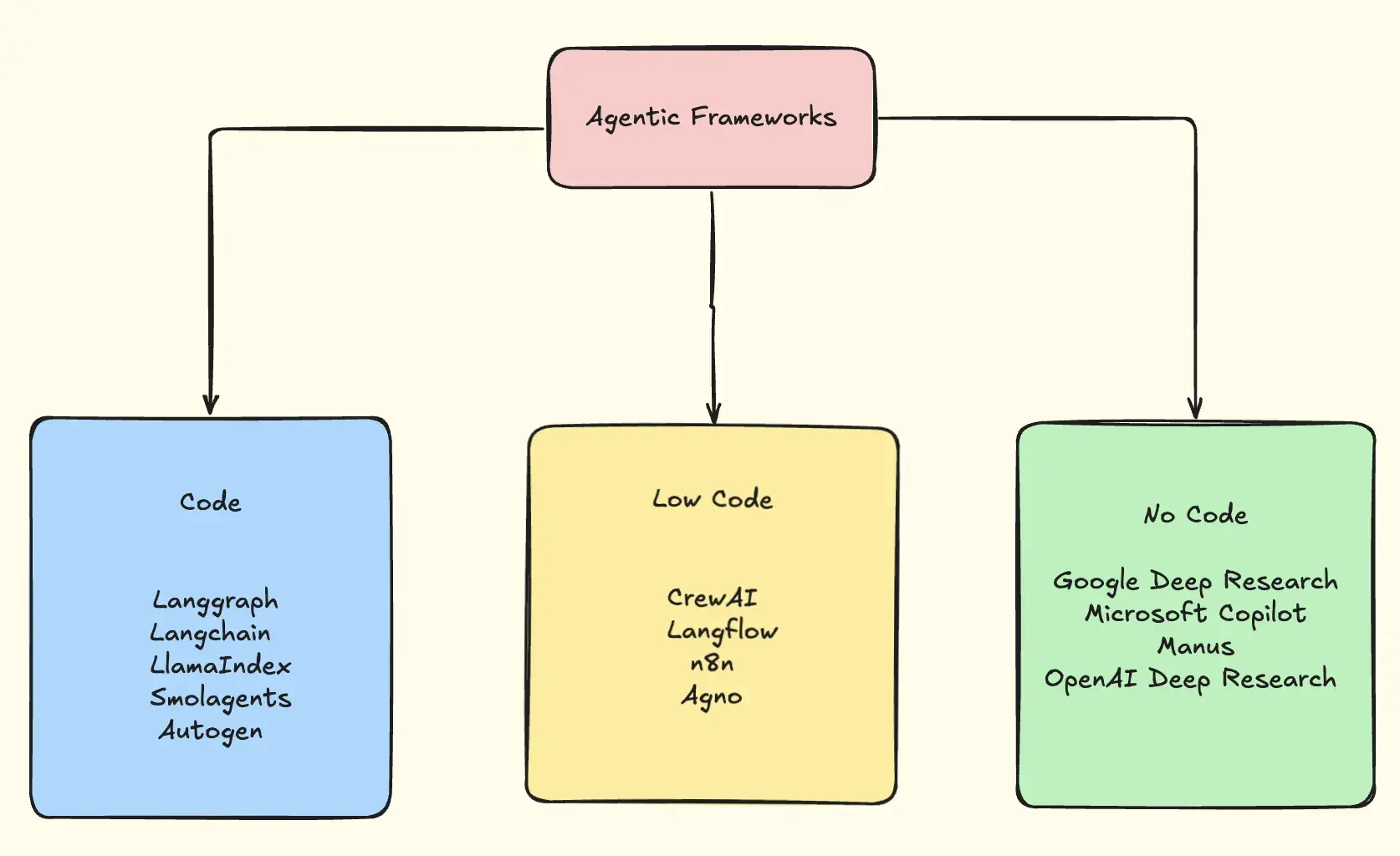
| Category | Framework | Key Features & Details |
|---|---|---|
| Code | LangChain | • Foundational toolkit for LLM apps and agents • Modular primitives: prompts, tools, memory, retrievers • Ideal when you want to wire everything yourself |
| Code | LangGraph | • Graph-based orchestration on top of LangChain • Supports branching, loops, retries, and conditional logic • Much more deterministic than classic agent loops |
| Code | LlamaIndex | • Purpose-built for RAG + external data • Indexes documents, databases, vector stores • Best when agents must know things beyond the base model |
| Code | SmolAgents | • Minimalist agent framework from Hugging Face • Agents write and execute Python code as actions • Fewer steps, fewer tokens, less overhead |
| Code | AutoGen | • Multi-agent conversations (planner, coder, reviewer, etc.) • Built-in code execution (local, Docker, Jupyter) • Excellent for AI pair-programming and research workflows |
| Low-Code | LangFlow | • Drag-and-drop UI for LangChain • Visualize prompts, tools, memory, chains • Great for experimentation and demos |
| Low-Code | CrewAI | • Agents organized as roles in a crew • Built-in planning, memory, task coordination • Ideal for workflows that naturally split into sub-tasks |
| Low-Code | n8n | • Visual workflow automation + AI agents • Triggers, branching logic, integrations • Agent runs inside a broader business workflow |
| Low-Code | Agno | • Performance-first, full-stack multi-agent system • Model-agnostic, fast startup, minimal memory • Still evolving, but very promising |
| No-Code | Manus AI | • Fully autonomous, long-running agent • Plans, executes, reflects, and continues until done • Uses tools, browsing, code execution internally |
| No-Code | Deep Research (OpenAI & Gemini) | • Goal-driven research agents that gather, synthesize, and report • No orchestration required |
Workflow Pattern & Agentic Patterns
As we all know that Software Engineering is made up of 'patterns' and 'protocols', and having patterns in a way provides us with a structured, proven way to think and design systems, and helps in preventing common design mistakes.
They promote best practises, and shared understanding amongst developers.
Workflow Patterns
Prompt Chaining
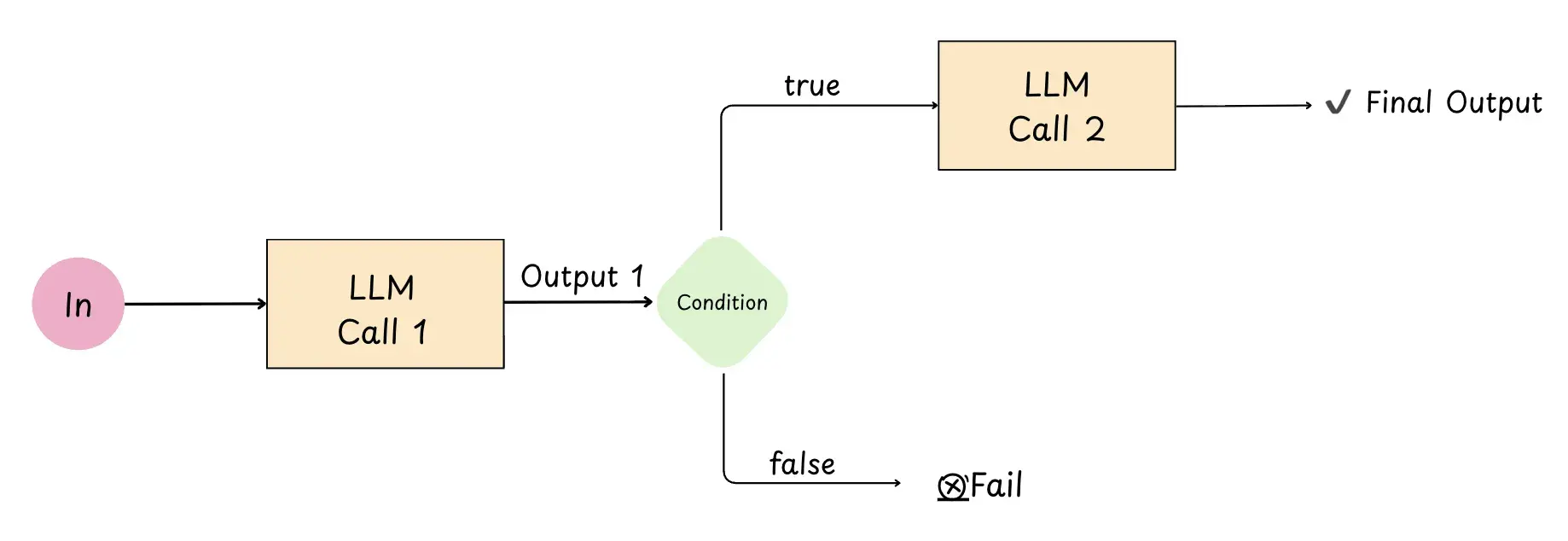 Prompt chaining is a pattern where a bigger problem is solved by doing multiple LLM calls sequentially, where each calls output becomes the input to the other LLM call.
Why its useful :
Each step is simpler → often more accurate
intermediate steps where you get to take a decisions using certain conditions, to ensure that the process remains on track.
import os
from openai import OpenAI

client = OpenAI()  # reads OPENAI_API_KEY from environment

# --- Step 1: Summarize Text ---
original_text = (
    "Edge computing moves data processing closer to where it’s generated—like sensors, phones, or factory machines. "
    "This reduces latency, saves bandwidth, and can improve privacy, but it also adds challenges like distributed "
    "monitoring, updates at scale, and handling inconsistent connectivity."
)

prompt1 = f"Summarize the following text in one sentence: {original_text}"

resp1 = client.responses.create(
    model="gpt-5.2",
    input=prompt1
)

summary = resp1.output_text.strip()
print(f"Summary: {summary}")

# --- Step 2: Translate the Summary into Kannada ---
prompt2 = (
    "Translate the following summary into Kannada. "
    "Only return the translation, no other text:\n"
    f"{summary}"
)

resp2 = client.responses.create(
    model="gpt-5.2",
    input=prompt2
)

translation = resp2.output_text.strip()
print(f"Kannada Translation: {translation}")
Routing
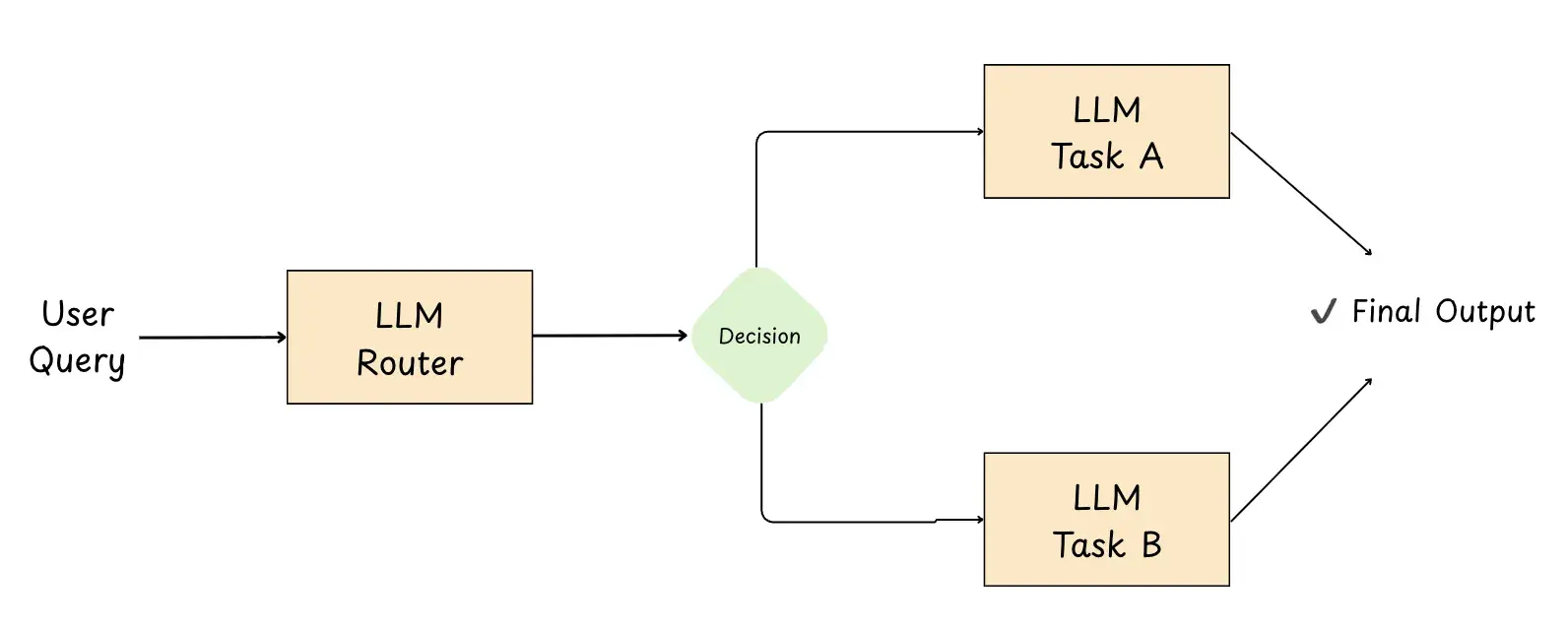
Routing is a pattern where an initial LLM acts like a dispatcher: it classifies the user’s input (intent/domain/complexity) and sends it to the most appropriate specialized workflow, prompt, tool, or model to complete the task.
Why its useful :
Separation of concerns : each downstream route can be optimized independently (prompts, tools, logic).
Better efficiency and cost : simple requests can go to cheaper/faster models, complex ones to stronger models.
Customer support systems: Routing queries to agents specialized in billing, technical support, or product information.
More reliable behavior : different input types (code, support, writing, images) get handled by purpose-built flows.
import enum
from pydantic import BaseModel
from openai import OpenAI

client = OpenAI()


class Category(str, enum.Enum):  # Define routing schema
    TRAVEL = "travel"
    CODING = "coding"
    OTHER = "other"

class RoutingDecision(BaseModel):
    category: Category
    reasoning: str

# -----------------------------
# 2) Router step (structured output)
# -----------------------------
user_query = "Plan a 2-day itinerary for Barcelona with food + museums."
# user_query = "Why is my Python list comprehension returning None?"
# user_query = "Write a LinkedIn post about learning distributed systems."

router_system = """
You are a dispatcher for an assistant.

Pick EXACTLY ONE category:
- travel: itineraries, places to visit, logistics, packing, budget, local tips
- coding: debugging, writing code, explaining errors, architecture
- other: anything else or unclear

Return JSON matching:
{ "category": "...", "reasoning": "..." }

Keep reasoning to one short sentence.
"""

# This is where routing happens: a small/fast model classifies the request.
router_resp = client.responses.parse(
    model="gpt-4o-mini",
    input=[
        {"role": "system", "content": router_system},
        {"role": "user", "content": f"Query: {user_query}"},
    ],
    text_format=RoutingDecision,
)

decision: RoutingDecision = router_resp.output_parsed
print(f"Routing Decision: category={decision.category}, reasoning={decision.reasoning}")

# -----------------------------
# 3) Handoff (specialized downstream)
# -----------------------------
final_text = ""

if decision.category == Category.TRAVEL:
    travel_system = """
You are a travel planner.
Produce a practical plan with time blocks, map-friendly neighborhoods, and food suggestions.
Ask 1 quick question only if needed; otherwise make reasonable assumptions.
"""
    travel_prompt = f"Create a helpful response for: {user_query}"

    travel_resp = client.responses.create(
        model="gpt-4o",
        input=[
            {"role": "system", "content": travel_system},
            {"role": "user", "content": travel_prompt},
        ],
    )
    final_text = travel_resp.output_text

elif decision.category == Category.CODING:
    coding_system = """
You are a senior software engineer.
Ask for the missing details (language/runtime/error message) only if required.
Give a minimal repro idea + fix + short explanation.
"""
    coding_resp = client.responses.create(
        model="gpt-5.2",
        input=[
            {"role": "system", "content": coding_system},
            {"role": "user", "content": user_query},
        ],
    )
    final_text = coding_resp.output_text

else:
    other_system = """
You are a general assistant.
Clarify the user's goal if ambiguous; otherwise respond directly, concise and helpful.
"""
    other_resp = client.responses.create(
        model="gpt-4o",
        input=[
            {"role": "system", "content": other_system},
            {"role": "user", "content": user_query},
        ],
    )
    final_text = other_resp.output_text

print("\nFinal Response:\n", final_text.strip())
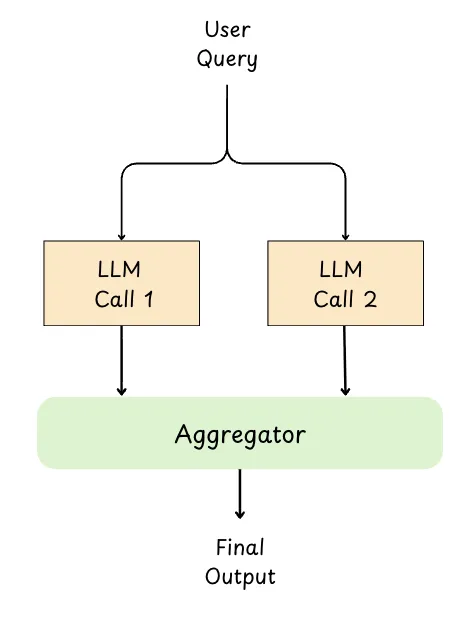
Parallelization
Parallelization is a pattern where a task is split into independent subtasks and sent to multiple LLM calls at the same time.
Once all branches finish, their outputs are collected and either combined programmatically or passed to a final “aggregator” LLM to synthesize the best final answer.
# pip install -U openai
import asyncio
import time
from openai import AsyncOpenAI

# Expects OPENAI_API_KEY in your environment
# mac/linux: export OPENAI_API_KEY="..."
# windows (powershell): setx OPENAI_API_KEY "..."
client = AsyncOpenAI()

async def generate_text(prompt: str, model: str = "gpt-4o-mini") -> str:
    """One async LLM call (used for the parallel branches)."""
    resp = await client.responses.create(
        model=model,
        input=prompt,
    )
    return resp.output_text.strip()

async def parallelization_workflow() -> str:
    # --- Define independent parallel tasks (same model, different prompts) ---
    theme = "a curious astronaut discovering an underwater city"
    prompts = [
        f"Pitch a *hopeful* short story idea about: {theme}. Keep it to 3-4 sentences.",
        f"Pitch a *thriller* short story idea about: {theme}. Keep it to 3-4 sentences.",
        f"Pitch a *heartfelt* short story idea about: {theme}. Keep it to 3-4 sentences.",
    ]

    start = time.time()
    tasks = [generate_text(p, model="gpt-4o-mini") for p in prompts]  # concurrent calls
    ideas = await asyncio.gather(*tasks)
    elapsed = time.time() - start
    print(f"Time taken (parallel): {elapsed:.2f} seconds\n")

    print("--- Individual Results ---")
    for idx, idea in enumerate(ideas, 1):
        print(f"Idea {idx}:\n{idea}\n")

    # --- Aggregation step (one final synthesizer call) ---
    joined = "\n".join([f"Idea {i+1}: {txt}" for i, txt in enumerate(ideas)])
    aggregator_prompt = (
        "You are an editor. Merge the three ideas below into ONE cohesive story premise.\n"
        "Constraints:\n"
        "- 1 paragraph\n"
        "- Keep the best elements from each idea\n"
        "- Preserve the original theme\n\n"
        f"{joined}"
    )

    aggregation_resp = await client.responses.create(
        model="gpt-5.2",  # stronger model for synthesis (optional)
        input=aggregator_prompt,
    )
    return aggregation_resp.output_text.strip()

def main():
    result = asyncio.run(parallelization_workflow())
    print("\n--- Aggregated Summary ---")
    print(result)

if __name__ == "__main__":
    main()
Why its useful :
Faster end-to-end latency : independent subtasks run concurrently instead of waiting step-by-step.
Better quality : you can generate multiple perspectives and merge them, or use majority voting to reduce errors.
Scales well for batch work : summarizing multiple sections/documents or repeating the same reasoning across many inputs.
Cleaner synthesis stage : results can be validated, deduped, and then combined into one coherent output.
Orchestrator-Workers
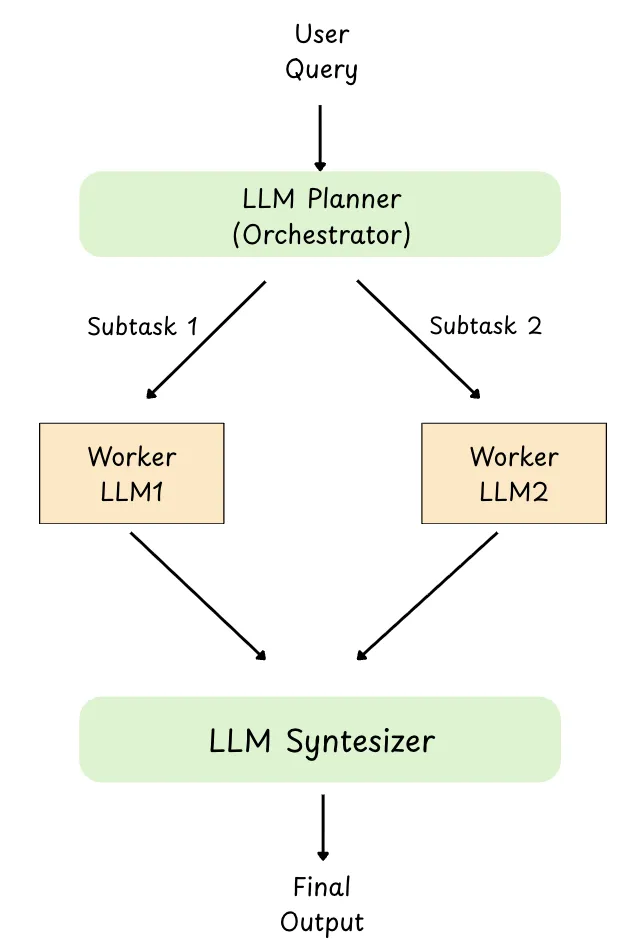
Orchestrator-workers is a pattern where one central LLM (the orchestrator) reads the user’s request, breaks it into subtasks dynamically, assigns each subtask to a specialized worker LLM, and then combines the workers’ outputs into a final response.
Unlike parallelization, the subtasks are not pre-defined, the orchestrator decides what work needs to be done based on the specific input.
Why its useful :
Handles unpredictable complexity : the orchestrator can decide which subtasks are needed on the fly.
Division of labor : workers can be role-based (planner, researcher, coder, reviewer) with specialized prompts/tools.
More scalable systems : you can add or swap workers without changing the whole workflow.
Better final quality : an orchestrator can validate, reconcile conflicts, and synthesize a coherent output.
Example : Scan the repo, find the entrypoints (main.py/app.py), list routes/dependencies, and return a short JSON summary of what files will need changes. The orchestrator first delegates this scanning subtask to a worker so it can dynamically decide the next subtasks (which files to edit, what workers to call next), since that isn’t knowable upfront.
# pip install -U openai pydantic

from typing import List
from pydantic import BaseModel, Field
from openai import OpenAI

client = OpenAI()

# -----------------------------
# Schema: Plan + Tasks
# -----------------------------
class Task(BaseModel):
  task_id: int
  description: str
  assigned_to: str = Field(description="Worker type: Researcher or Writer")

class Plan(BaseModel):
  goal: str
  steps: List[Task]

# -----------------------------
# Worker implementations
# -----------------------------
def researcher_worker(goal: str) -> str:
  prompt = f"""
You are a Researcher.
Goal: {goal}

Produce:
- 5 punchy bullet points (benefits of AI agents)
- 2 real-world examples (generic, no web browsing)
Keep it concise.
"""
  resp = client.responses.create(model="gpt-4o-mini", input=prompt)
  return resp.output_text.strip()

def writer_worker(goal: str, notes: str) -> str:
  prompt = f"""
You are a Writer.
Write a short blog post (~250-350 words) for a general tech audience.

Goal: {goal}

Use these notes (don’t invent new facts beyond them):
{notes}

Structure:
- Hook (1-2 lines)
- 3 benefit sections with short headings
- Closing takeaway
"""
  resp = client.responses.create(model="gpt-4o", input=prompt)
  return resp.output_text.strip()

# -----------------------------
# Orchestrator: plan -> delegate -> synthesize
# -----------------------------
user_goal = "Write a short blog post about why AI agents are useful in real products."

planner_prompt = f"""
You are an orchestrator. Create a minimal plan to achieve the goal.
Use ONLY these worker types: Researcher, Writer.

Return JSON with:
- goal
- steps: list of {{task_id, description, assigned_to}}

Goal: {user_goal}
"""

# Step 1: Generate a dynamic plan (structured output)
plan_resp = client.responses.parse(
  model="gpt-4o",          # strong planner
  input=planner_prompt,
  text_format=Plan,
)

plan: Plan = plan_resp.output_parsed
print(f"Goal: {plan.goal}\n")
for step in plan.steps:
  print(f"Step {step.task_id}: {step.description} (Assignee: {step.assigned_to})")

# Step 2: Execute the plan (workers)
notes = ""
final_post = ""

for step in plan.steps:
  if step.assigned_to.lower() == "researcher":
      notes = researcher_worker(plan.goal)
  elif step.assigned_to.lower() == "writer":
      final_post = writer_worker(plan.goal, notes)
  else:
      # fallback: if planner outputs something unexpected
      resp = client.responses.create(
          model="gpt-4o-mini",
          input=f"Goal: {plan.goal}\nTask: {step.description}\nWrite a helpful output."
      )
      final_post = resp.output_text.strip()

print("\n--- Research Notes ---\n", notes)
print("\n--- Final Blog Post ---\n", final_post)
AI Agentic Patterns
ReACT Pattern
The React Pattern that we discussed in the above sections, also comes as one of the Agentic Patterns.
Evaluator-Optimizer (Reflection)
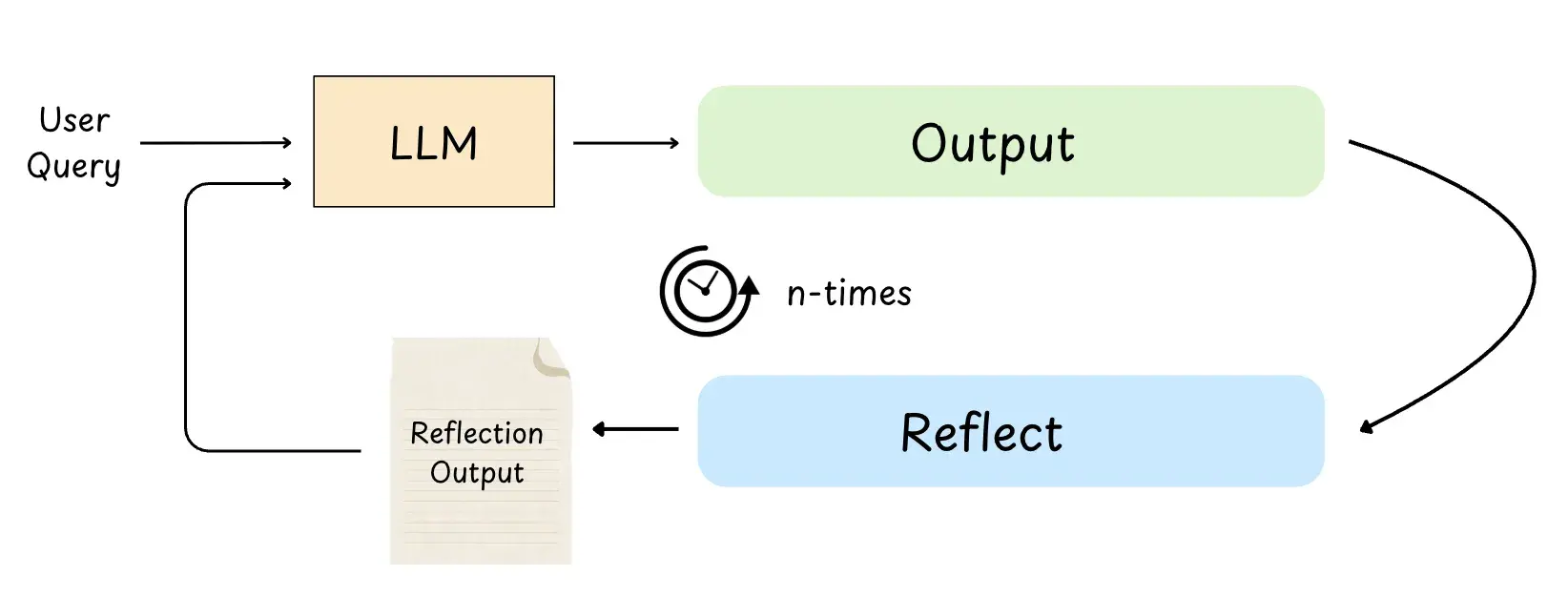
Evaluator-Optimizer (also called Reflection) is a pattern where the agent generates an initial draft, then runs a critique step to evaluate it against requirements (clarity, accuracy, tone, constraints), and uses that feedback to iteratively refine the output until it’s satisfactory or a max-iteration limit is reached.
Why its useful :
Improves quality : catches mistakes, missing requirements, and weak reasoning before the answer is finalized.
Makes outputs more reliable : the evaluator can act like a reviewer (accuracy, clarity, security, style).
Great for subjective work : writing, tone, structure, and “does this meet the rubric?” tasks benefit a lot.
Example : The agent writes a function
is_valid_email(), runs unit tests, sees failures, reflects on the edge cases, and rewrites the function until tests pass.
# pip install -U openai pydantic

import enum
from pydantic import BaseModel
from openai import OpenAI

client = OpenAI()

# -----------------------------
# Structured evaluation schema
# -----------------------------
class EvaluationStatus(str, enum.Enum):
    PASS = "PASS"
    FAIL = "FAIL"

class Evaluation(BaseModel):
    evaluation: EvaluationStatus
    feedback: str
    reasoning: str

# -----------------------------
# 1) Initial generation (write code)
# -----------------------------
def generate_function(feedback: str | None = None) -> str:
    prompt = """
Write a Python function `is_palindrome(s: str) -> bool`.

Rules:
- Case-insensitive
- Ignore spaces and punctuation (keep only alphanumeric)
- Return True if palindrome, else False
- Output ONLY python code (no markdown, no explanation)
"""
    if feedback:
        prompt += f"\nFix based on this feedback:\n{feedback}\n"

    resp = client.responses.create(
        model="gpt-4o-mini",
        input=prompt,
    )
    code = resp.output_text.strip()
    print(f"\nGenerated Code:\n{code}")
    return code

# -----------------------------
# 2) Evaluation (review + unit tests)
# -----------------------------
def evaluate(code: str) -> Evaluation:
    print("\n--- Evaluating Code ---")
    critique_prompt = f"""
You are a strict code reviewer + test author.

Check the code for:
1) Correctness vs rules
2) Edge cases
3) Whether it will pass the unit tests you would write

Return JSON with:
- evaluation: PASS or FAIL
- feedback: specific fixes needed
- reasoning: 1 short sentence

Code:
{code}

These unit tests must pass:
- is_palindrome("Racecar") == True
- is_palindrome("A man, a plan, a canal: Panama!") == True
- is_palindrome("No lemon, no melon") == True
- is_palindrome("hello") == False
- is_palindrome("") == True
- is_palindrome("12321") == True
- is_palindrome("123ab321") == False
"""
    critique_resp = client.responses.parse(
        model="gpt-4o-mini",
        input=critique_prompt,
        text_format=Evaluation,
    )
    result: Evaluation = critique_resp.output_parsed
    print(f"Evaluation Status: {result.evaluation}")
    print(f"Feedback: {result.feedback}")
    print(f"Reasoning: {result.reasoning}")
    return result

# -----------------------------
# Reflection loop (Evaluator-Optimizer)
# -----------------------------
max_iterations = 3

# Start with a deliberately "bad" implementation to demonstrate FAIL -> feedback -> improve
current_code = "def is_palindrome(s: str) -> bool:\n    return s == s[::-1]\n"

for i in range(1, max_iterations + 1):
    print(f"\n=== Iteration {i} ===")
    evaluation = evaluate(current_code)

    if evaluation.evaluation == EvaluationStatus.PASS:
        print("\n Final Code (PASS):")
        print(current_code)
        break
    else:
        current_code = generate_function(feedback=evaluation.feedback)

    if i == max_iterations:
        print("\n Max iterations reached. Last attempt:")
        print(current_code)
Tool Use Pattern
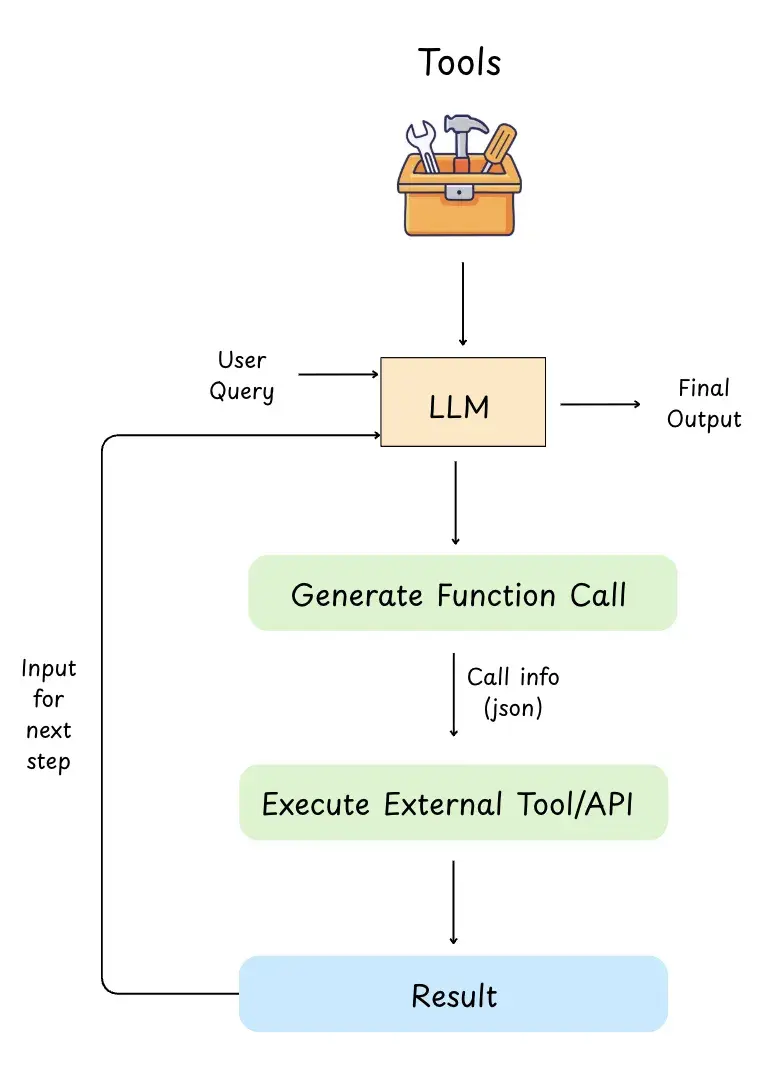
Like we discussed in the above sections that an LLM can only read text and write text right. It can’t actually look up live data, run code, or book something on its own.
In the Tool Use Pattern, we give the LLM access to tools (functions/APIs) like discussed in the above sections. (where the table image demonstrates the tool examples.) We also tell the LLM what each tool looks like:
- tool name
- what it does
- what inputs it needs (schema)
How it works (step-by-step) :
User asks a question
“Book a meeting for tomorrow” or “What’s Tesla stock price?”LLM decides it needs a tool
Because it can’t do that reliably from memory.LLM outputs a structured “function call” (often JSON)
Example:{"name":"get_stock_price","arguments":{"ticker":"TSLA"}}Your app runs the tool
The LLM does not run it, our backend executes the API/function.Tool returns results
Example:{"price":245.30}LLM uses that result to write the final answer
“TSLA is trading at $245.30 right now.”
This pattern is commonly implemented using Function Calling., and it lets the LLM do real actions and use real-time data, way beyond what it learned during training.
Common use cases:
- Booking appointments (calendar API)
- Getting real-time stock prices (finance API)
- Searching documents using embeddings (RAG / vector DB)
- Controlling smart devices (IoT tools)
- Running code or unit tests
Limitations of classic Tool Use are :
-
Tools are hardcoded into the application
-
The LLM only knows about tools you explicitly define
-
Adding new tools requires code changes + redeployment
-
Tools are tightly coupled to one model or framework
This lead to the birth of MCP.
The Tool Use Pattern defines how models think about using tools MCP defines how tools are described, discovered, and invoked
With MCP :
-
Tools live in external tool servers
-
Tools can be discovered dynamically
-
Tools describe themselves via standardized schemas
-
Models and apps are decoupled from tool implementations
-
The same tool can be reused by multiple models and clients
Conceptually, the interaction loop stays the same. You can read more about MCP in one of my blogs here where i have distinguished clearly the differences between an MCP and an API -> MCP vs API
Multi-Agent Pattern
The multi-agent pattern represents perhaps the most sophisticated approach to building AI systems.
Instead of relying on a single agent to handle everything, this pattern uses multiple specialized agents that collaborate to accomplish a common goal.
This pattern uses autonomous or semi-autonomous agents. Each of these agents are specialized in a certain task meaning they'll have specialized knowledge, or access to specific tools.
Each of these agents can interact, collaborate and coordinate with each other (either using a coordinator/manager or using handoffs logic. ) Handoff logic means one Agents handsover the control to another agent.
Example : In our first example of a travel assistant agent, say one agent is flight agent and it finds the besst flights for us, and then the hotel agent would be responsible for booking the hotel.
Some key characteristics of this pattern would be :
Parallel Execution : Subtasks can be handled simultaneously
Delegation : The main manager agent delegates the task to other agents based on the subtasks.
Distributed Context: Each agent has its own context, which is like the subset of the total information. (incase of swarm type handoff logic based multi agent setup, there usually is a unified context.)
Here' an image of the coordinator/manager approach.
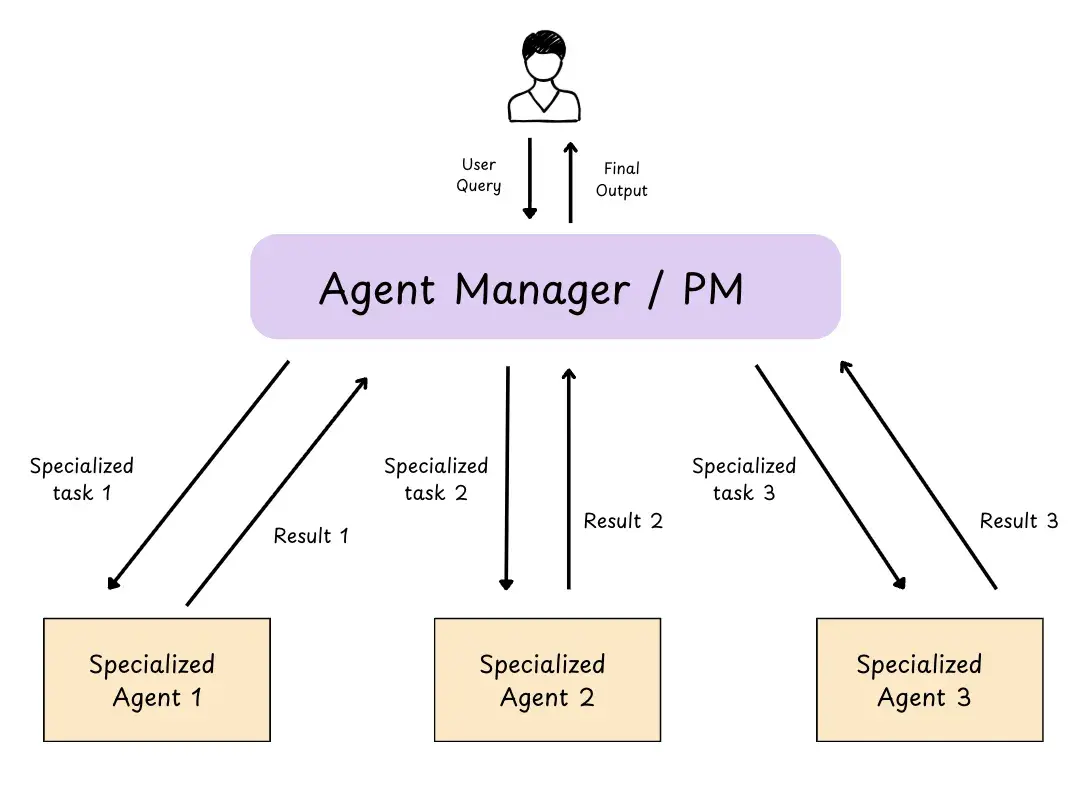 Here's an image of the hand-off based multi agent collaboration :
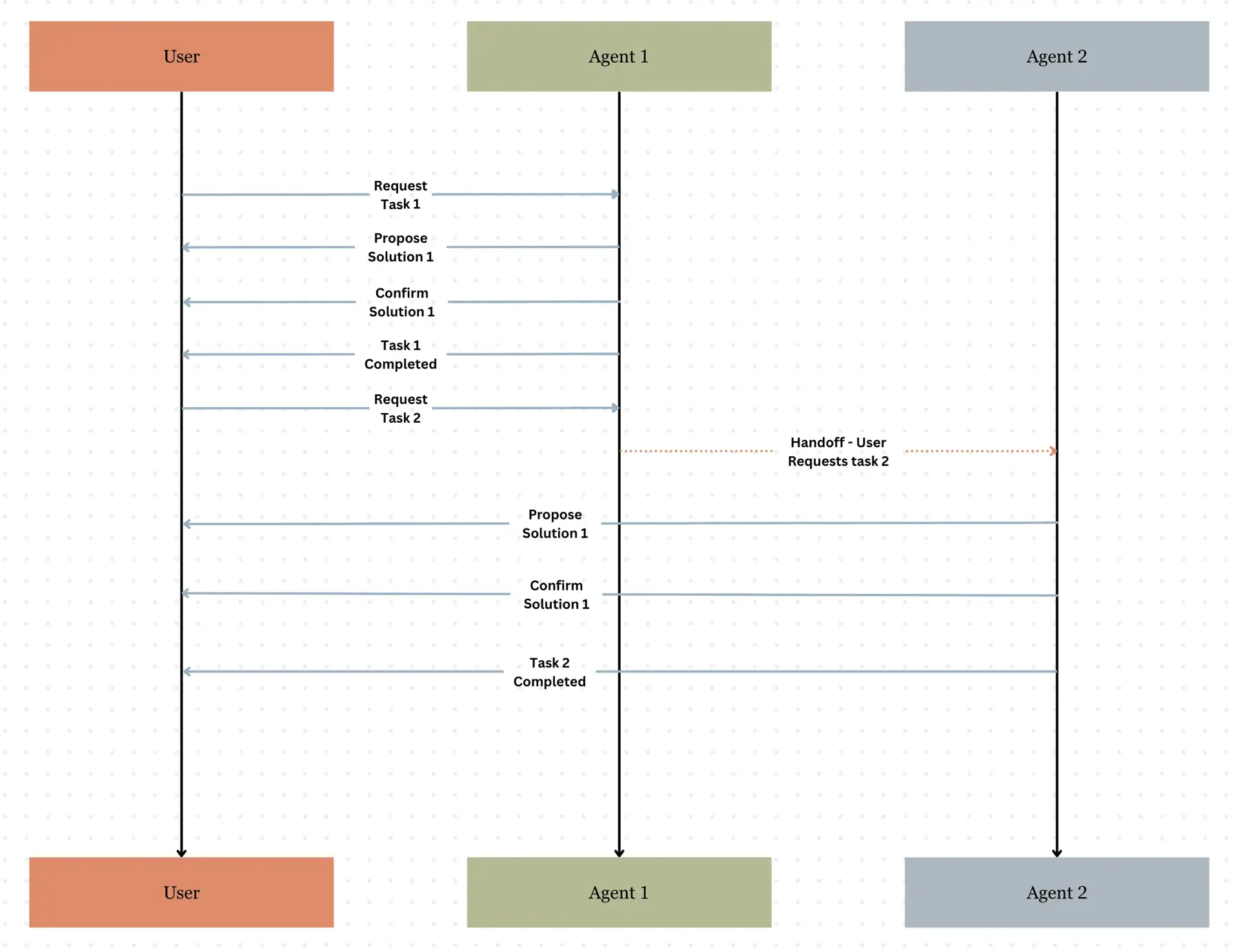
Let's talk more about these multi-agent systems in the next section, about how they share information and context, and how they call the other agent, how one agent knows that it has to call the other ? What are the multi agent patterns etc everything.
Multi-Agent Patterns
Subagents : Centralized orchestration / Agent as Tools
A subagent is a specialized Agent that is purpose-built for a single, well-defined task. It is mostly used with a main orchestrator agent which delegates the task to the subagents, These subagents has its own context window. Meaning the subagents are stateless (they do not remember the context on each request, every request is a different request.)
Claude Code loads the list of subagents at session start, but it only runs a subagent when needed.
This architecture provides centralized control where all routing passes through the main agent, which can invoke multiple subagents in parallel.
The only trade off is that one extra hop to the subagents is involved, and everytime a request arrives it has to flow through the main agent, and then to subagent, and exactly in the opposite fashion while sending the response. So when this model hop is involved, extra tokens are being used, hence more cost, and ofcourse more latency.
Deep Agents provides an out-of-the-box implementation for adding subagents with just a few lines of code. (if needed delegates complex subtasks to specialized subagents)
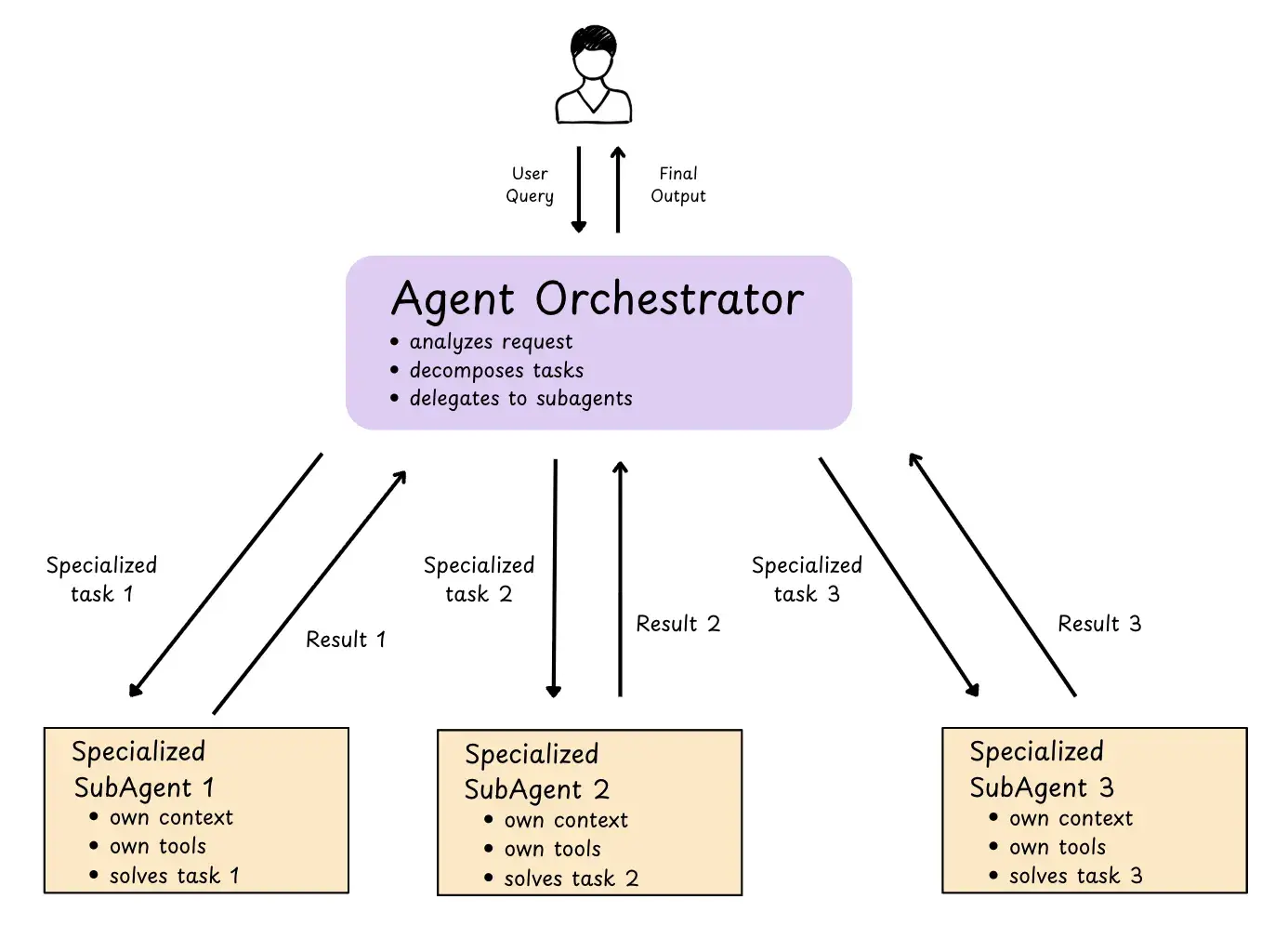 Agent as a tool is a name provided by OpenAI for this pattern.
OpenAI documentation and in Claude Code docs
Agent as a tool is a name provided by OpenAI for this pattern.
OpenAI documentation and in Claude Code docs
Again there can be various ways in which this pattern can be used :
Run Parallely :
We can call multiple subagents in parallel to work simultaneously. This kind of pattern is good when the task of both the subagents are independent.Chain Subagents
In this one, the subagents run in sequence meaning, one subagent completes its task and returns to the main orchestrator, which then returns and sends to the next subagent.
Skills Pattern
In this pattern the agent loads the prompts and knowledge on demand, only when needed. It is also called as progressive discolsure.
Let's take a look at the image, and then understand what it is and how it really works.
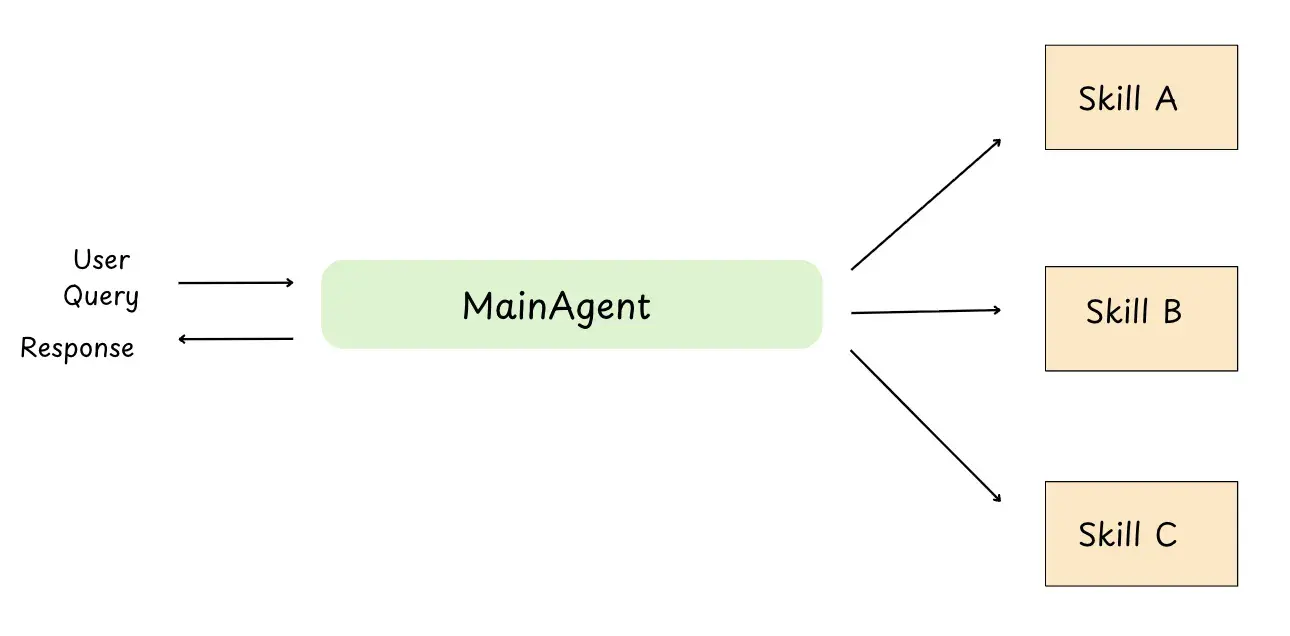
You can see from the image that only one main agnet is used, so how can it be a multi-agent pattern ??
so the thing is we are trying to use the main agent as if it is specialized in so many skills, so its like we are loading the context of that skill only when its needed.
Each skill is like a small “playbook”:
-
a prompt (how to think / how to respond)
-
rules (what to do / what not to do)
-
examples / knowledge (so it doesn’t hallucinate)
-
sometimes scripts/tools (commands it can run)
The main idea: the agent does not carry all skills in its head all the time. It only loads the skill context when that skill is needed.
So it feels like a multi-agent system, because the same agent can switch between “modes” (SQL mode, Payments mode, Debug mode, etc.). But technically it’s still one agent, just with on-demand context loading.
HandOffs Pattern
In this pattern, one main agent talks to the user.
When the main agent understands that the request is not its job, it can say: “I don’t handle this, but another agent does… so I will hand it off.”
Then the task gets passed to the right agent (the specialist agent), and that agent becomes active and works on it.
After the specialist finishes, the main agent can show the final answer to the user (or the specialist can reply directly, depending on how the system is built).
Exactly like the image we saw above in the Multi Agent pattern section.
Router Pattern
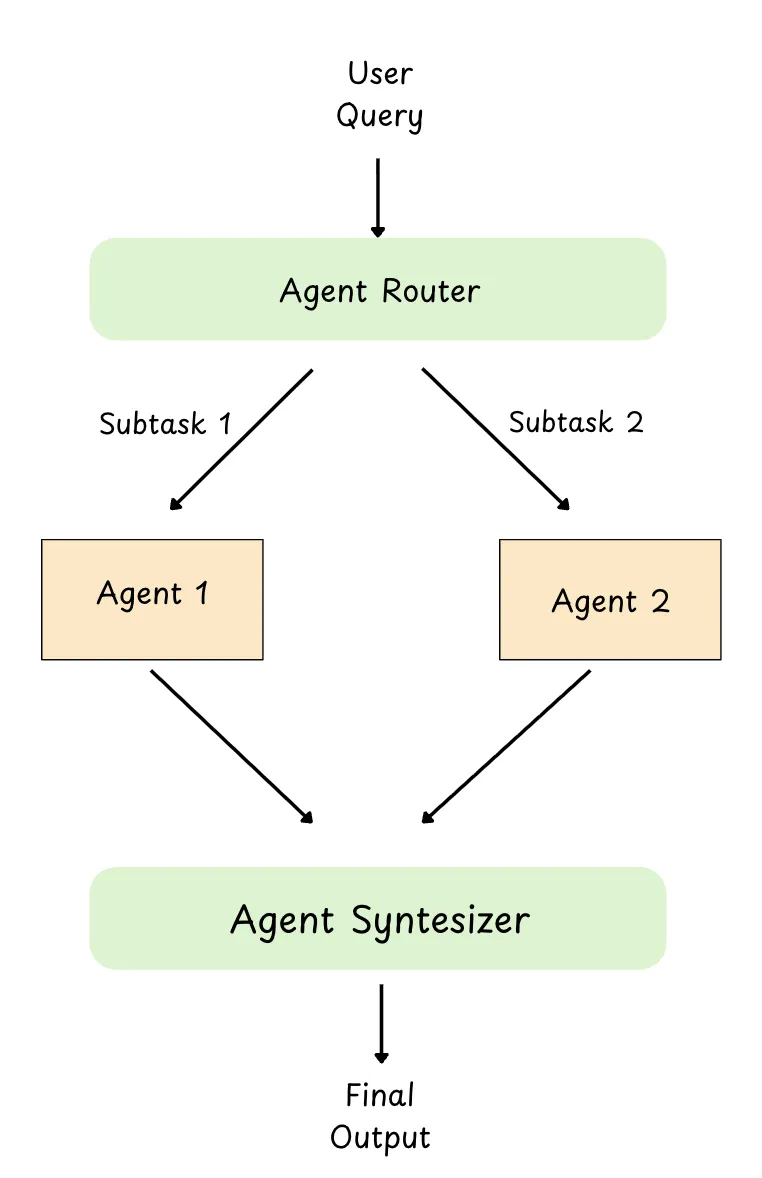
This pattern is very similar to the “agent + tools” setup we saw earlier. The only difference is: instead of routing to tools, we route to agents.
So you can think of it like this:
-
In tools pattern: the agent decides which tool to call.
-
In router pattern: the router decides which agent to call (refund agent, booking agent, debugger agent, etc.)
The router’s job is simple: it reads the user request, picks the best agent, and forwards the task to that agent.
Thanks to Langchain for creating this beautiful table.
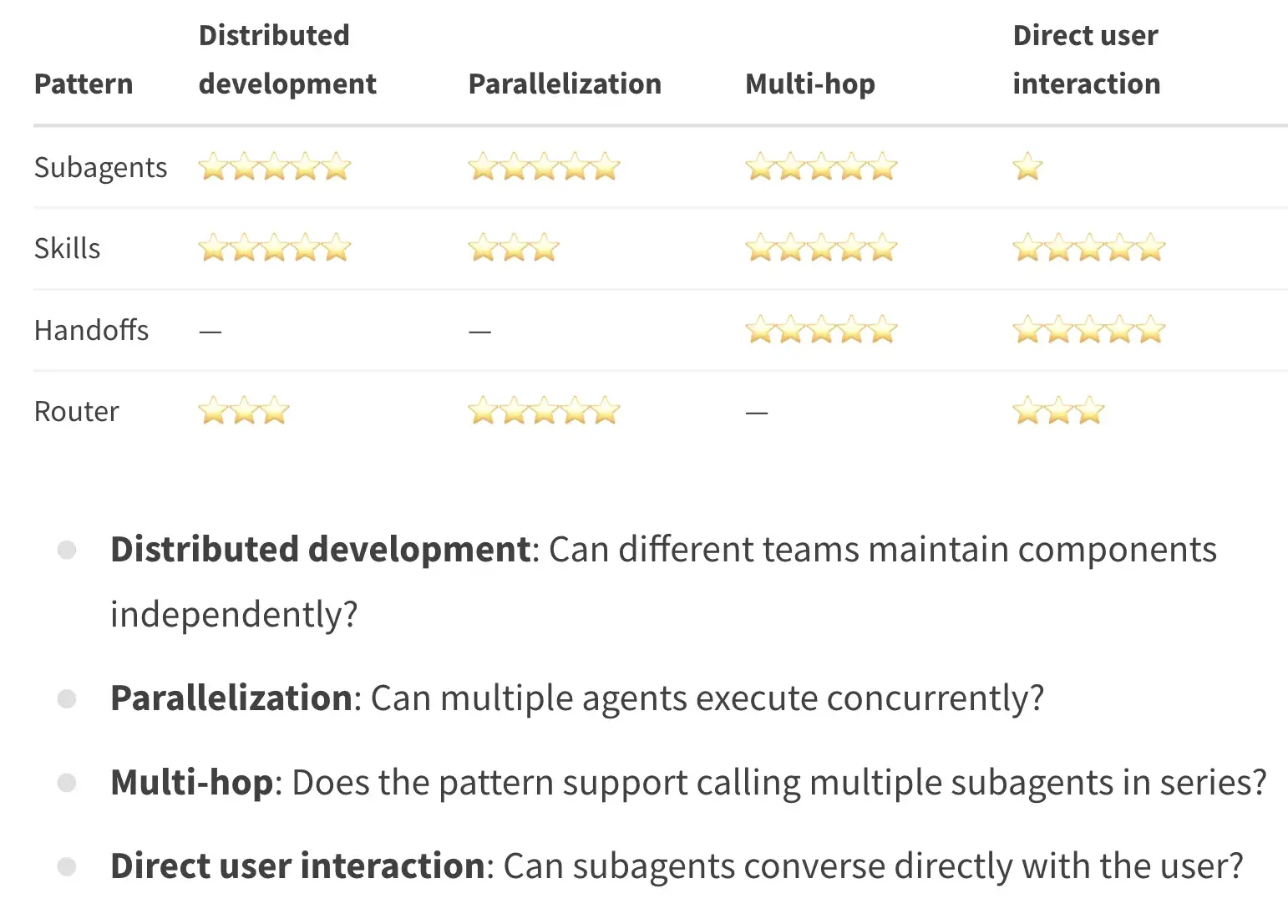
Fact: In these multi-agent patterns the agent to agent calling is synchronous right, so if you want an event-driven distributed system for these multi agents. Check out this link to read more about it Distributed Event Drivern Multi Agent Patterns
In the next part we will talk about Context Engineering and Evaluatin Strategies for AI Agents.
Checkout more of my writing in AI
A few more AI pieces you might like:
Next Steps
Next in the series, I'll dive more into:
- Context: managing what the agent uses as input
- Evaluation: checking if the agent is working and improving
- Reliability & security: keeping the agent safe and resilient
- Observability: monitoring the agent’s behavior, tool usage, and failures
- Cost & performance: making the agent faster and cheaper to run
- Guardrails: adding rules and protections before shipping the agent
If this was useful, subscribe to my weekly newsletter: Evolving Engineer
Support my writing here: buymeacoffee.com/cpradyumnao